Guides · AI & DevOps · claude-code · gitlab · ci-cd
Claude Code in GitLab CI/CD: What the Setup Actually Takes
· 7 min read
Claude Code runs in GitLab CI/CD. You add a job to .gitlab-ci.yml, set one masked variable, and Claude can turn issues into merge requests, implement changes from an MR comment, and iterate on follow-up feedback.
Two things to know before you plan around it. The integration is in beta and maintained by GitLab, not Anthropic — support goes through a GitLab issue rather than Anthropic’s channels. And the @claude mention trigger that works out of the box on GitHub is something you build yourself on GitLab. Neither is a dealbreaker. Both change the effort estimate considerably, and neither is obvious from the quick-start snippet.
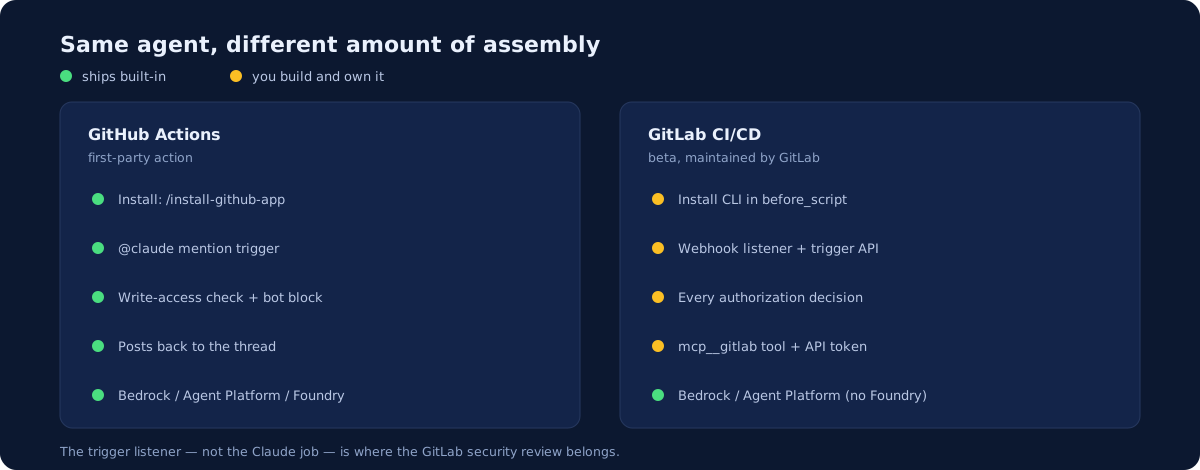
What you get, and what you build
The GitHub integration is a purpose-built action. The GitLab integration is the Claude Code CLI running headless in a job, wired to GitLab through an MCP server. That difference explains most of the table below.
| GitHub Actions | GitLab CI/CD | |
|---|---|---|
| Integration | First-party action | Beta, maintained by GitLab |
| Install | /install-github-app, one command |
Add a job, install the CLI in before_script |
@claude mention trigger |
Built in | You build the webhook listener |
| Who-can-trigger checks | Built in (write access, bot block) | Your listener’s responsibility |
| Cloud providers | Bedrock, Agent Platform, Foundry | Bedrock, Agent Platform — no Foundry |
| Posting back to the thread | Handled by the action | Via mcp__gitlab tool + a token |
Nothing here says GitLab is worse. It says GitLab is lower-level: you are assembling the pieces the GitHub action pre-assembles, which buys flexibility and costs a day or two.
The minimal job
A masked ANTHROPIC_API_KEY under Settings → CI/CD → Variables, then:
stages: [ai]

claude:
  stage: ai
  image: node:24-alpine3.21
  rules:
    - if: '$CI_PIPELINE_SOURCE == "web"'
    - if: '$CI_PIPELINE_SOURCE == "merge_request_event"'
  variables:
    GIT_STRATEGY: fetch
  timeout: 30m
  before_script:
    - apk add --no-cache git curl bash
    - curl -fsSL https://claude.ai/install.sh | bash
    - export PATH="$HOME/.local/bin:$PATH"   # installer target isn't on PATH in this image
  script:
    - /bin/gitlab-mcp-server || true
    - >
      claude
      -p "${AI_FLOW_INPUT:-'Review this MR and implement the requested changes'}"
      --permission-mode acceptEdits
      --allowedTools "Bash Read Edit Write mcp__gitlab"
      --max-turns 10
Test it by running the job manually from CI/CD → Pipelines before wiring any triggers. If it can read the repo and open an MR by hand, the plumbing works.
Two details worth noticing. --permission-mode acceptEdits is what lets the agent write without an interactive prompt — it is doing in CI what you would otherwise approve by hand, so the branch protection around it is your real control. And mcp__gitlab must be in --allowedTools or Claude can read the code but cannot comment or open an MR, which produces a confusing “it ran and did nothing visible” failure.
The @claude trigger is yours to build
This is the part that surprises teams migrating a GitHub setup.
On GitHub, the action listens for @claude, verifies the commenter has write access, and rejects bots — all before Claude starts. On GitLab, there is no equivalent. The documented pattern is:
- Add a project webhook for “Comments (notes)” pointing at a listener you host.
- The listener inspects the comment, decides whether it should run, and calls GitLab’s pipeline trigger API.
- It passes context along as
AI_FLOW_INPUT,AI_FLOW_CONTEXT, andAI_FLOW_EVENT, which the job reads.
So you are writing and hosting a small service, and every authorization decision the GitHub action makes for you is now yours. Who is allowed to invoke the agent? Does a comment on a fork count? What stops a bot triggering a loop? If you skip these questions, you have built an agent that any commenter can run against your repository with acceptEdits enabled.
That is not a reason to avoid GitLab. It is a reason to scope the work honestly: the trigger listener, not the Claude job, is where the security review belongs.
If manual and MR-event runs cover your use case, skip the listener entirely. Plenty of teams get most of the value from a job that runs on merge request events and never needs mention-driven triggering at all.
Giving the job GitLab API access
Two options. CI_JOB_TOKEN is the default and needs no setup, but its permissions are limited. If the job needs to post comments or open MRs and the job token can’t, create a Project Access Token with api scope and store it masked as GITLAB_ACCESS_TOKEN.
Prefer the job token where it works — it is scoped to the pipeline and expires with it. A Project Access Token is a long-lived credential, which means it belongs in your rotation schedule alongside everything else.
Running on Bedrock or Vertex
Both are supported, and the reasons are the same as on GitHub — data residency, procurement, no static key. The mechanism differs in one way worth flagging: GitLab uses environment variables where the GitHub action uses inputs. You set CLAUDE_CODE_USE_BEDROCK: "1" or CLAUDE_CODE_USE_VERTEX: "1" in the job’s variables: block rather than passing use_bedrock: "true" to an action.
GitLab mints the OIDC token through an id_tokens: block, exposing it as GITLAB_OIDC_TOKEN, and the job trades it for cloud credentials — aws sts assume-role-with-web-identity on AWS, or a Workload Identity Federation credential file on GCP. Set aud to the audience you configured on the identity provider.
One easy-to-miss detail on GCP: GCP_WORKLOAD_IDENTITY_PROVIDER is the provider resource name without the //iam.googleapis.com/ prefix. The credential JSON adds that prefix itself, and including it twice fails with an unhelpful error.
The cloud-side trust setup — the OIDC provider, the scoped role, the repository condition — is identical in shape to the GitHub version. We cover it in depth in running Claude Code on Bedrock, Vertex, or Foundry; the trust configuration is the same, only the CI-side plumbing changes.
Cost and safety controls
The same two meters as anywhere: runner minutes and tokens. GitLab gives you timeout at the job level; Claude Code gives you --max-turns. Set both. Then limit concurrency so a burst of comments can’t start ten agents at once.
The safety controls are ordinary CI controls, and they matter more here than the prompt does:
- Every change lands as an MR, so branch protection and approvals still apply.
- Keep the job’s network egress and permissions minimal.
- Review Claude’s MRs like any other contributor’s.
- Keep
CLAUDE.mdfocused — it is read on every run, so bloat costs tokens each time. Our post on AGENTS.md, CLAUDE.md, and Cursor rules covers what belongs in it.
One version note: the docs state that exact flags may vary by @anthropic-ai/claude-code version and suggest running claude --help in the job to confirm. Pin your image and check after upgrades rather than assuming a flag survived.
Should you use it?
If you are already on GitLab, yes — with a clear-eyed estimate. A job that runs on merge request events is genuinely a half-day. Full mention-driven triggering with proper authorization is a small internal service, and that is the piece teams underestimate.
If you are choosing a CI platform and agent tooling is a significant factor, the GitHub integration is more mature today: first-party, turnkey triggering, and built-in authorization checks. That is a real difference, though a narrow one to pick a CI platform over.
What does not change between platforms is the part that actually determines whether this is safe: least-privilege credentials, a human review gate, and caps on what one run can do. Our Claude Code GitHub Actions guide works through those in detail, and the reasoning transfers directly.
Who owns this?
The listener, the tokens, the runner permissions, and the review gate are all platform work — and on GitLab there is more of it, because you are assembling what the GitHub action ships pre-built. At 5-25 engineers that is rarely a full-time job but it is nobody’s spare afternoon either. It is the shape of work a monthly DevOps retainer covers. If you have this running already and want the trigger path reviewed before it becomes load-bearing, our infrastructure audit includes CI/CD review.
Setup steps, variable names, and provider configuration follow Anthropic’s Claude Code GitLab CI/CD documentation, which notes the integration is in beta and maintained by GitLab.
Newsletter
One practical DevOps guide a week
Real numbers, honest trade-offs, no vendor fog — same as everything here. Unsubscribe anytime.