Guides · AI & DevOps · claude-code · github-actions · cloud-security
Run Claude Code on Bedrock, Vertex, or Foundry in CI
· 8 min read
By default the Claude Code GitHub Action calls the Claude API directly. Three inputs change that: use_bedrock: "true" for Amazon Bedrock, use_vertex: "true" for Google Cloud’s Agent Platform, and use_foundry: "true" for Microsoft Foundry. Inference then runs through your own cloud account, billed to your existing agreement, inside the region you choose.
The input is the easy part. What it costs you is a chunk of identity plumbing — an OIDC trust relationship, a scoped role, and a decision about which GitHub identity the agent uses — none of which the one-line input hints at. Here is the whole shape of it, plus one trap on public repositories that the setup guides mention only in passing.
Why route inference through your own cloud at all?
Four reasons come up repeatedly, and only one of them is technical.
Data residency. You pick the region. For teams with EU customers or a contractual commitment about where processing happens, “us-east5 in our own project” is an answer you can put in a DPA; “the vendor’s API” sometimes isn’t.
Procurement. Buying through an existing AWS, GCP, or Azure agreement is often dramatically faster than adding a new vendor. If you have committed spend to burn down, this draws against it.
Audit trail. Model invocations show up in your own CloudTrail or Cloud Audit Logs alongside everything else, rather than in a separate vendor console.
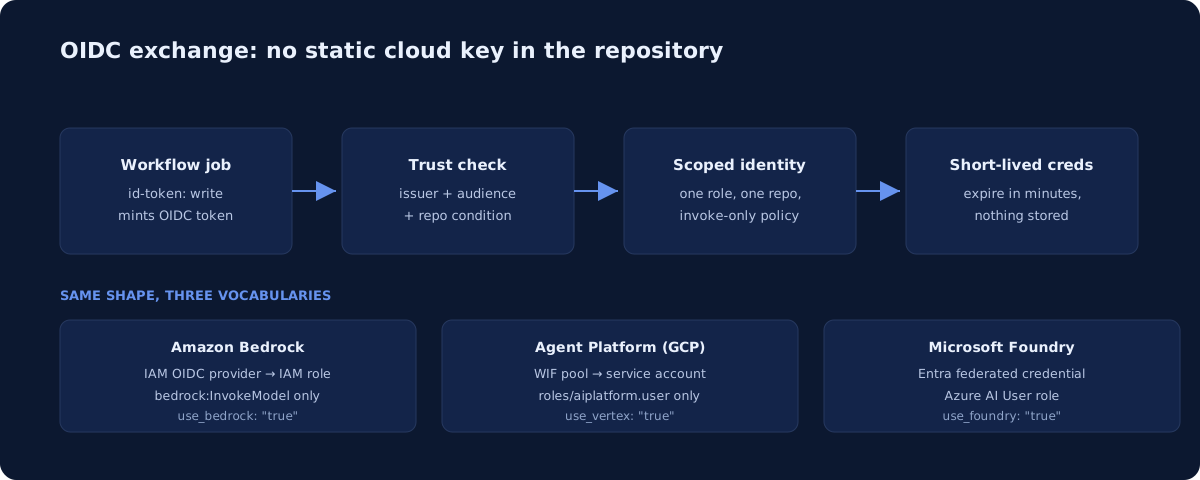
One less credential. All three paths authenticate with OIDC federation, so no long-lived cloud key sits in repository secrets — and with the provider handling inference, no ANTHROPIC_API_KEY sits there either.
That last point is worth dwelling on. The common setup — an API key in GitHub secrets — is a static credential with no expiry, readable by anyone who can add a workflow to the repo. The cloud-provider path removes it entirely. That is a real security improvement, not just a billing change.
If you are still setting up the basics, start with our Claude Code GitHub Actions guide; this post assumes the workflow already runs.
What you actually have to build
Four things, in this order:
- A GitHub identity for the agent to push commits and post comments as.
- Cloud-side trust configuration so your cloud accepts the workflow’s OIDC token.
- Repository secrets pointing at the role or identity you created.
- The workflow file wiring them together.
Step two is where the real work is, and it is different on each cloud.
Choosing the GitHub identity
The quick setup installs the official Claude GitHub App and moves on. With a cloud provider you make this call yourself, and the three options are not equivalent:
| Identity | Setup cost | Catch |
|---|---|---|
| Official Claude GitHub App | Lowest — install and done | Grants the app’s full permission set, which is broader than this action uses |
| Custom GitHub App | Register app, generate key, store two secrets | Only three permissions, but covers only the Action — not Code Review or web auto-fix |
GITHUB_TOKEN |
None | GitHub does not trigger your CI workflows on commits made with it |
That third row is the one that bites. If the agent’s commits don’t start your test pipeline, your review gate is inspecting a PR whose tests never ran. Pick GITHUB_TOKEN only for jobs that never push code.
The custom app is the right default for a security-conscious team. Register it with webhooks disabled, grant Contents, Issues, and Pull requests at read-and-write, generate a private key, and install it on the repo. You store the app ID as APP_ID and the .pem contents as APP_PRIVATE_KEY, then mint a token at run time with actions/create-github-app-token@v2.
The cloud-side trust configuration
Every cloud is doing the same thing — agreeing to trust tokens GitHub issues to your repository — with different nouns.
| Amazon Bedrock | Google Cloud Agent Platform | Microsoft Foundry | |
|---|---|---|---|
| Trust object | IAM OIDC identity provider | Workload Identity Pool + provider | Entra app + federated credential |
| Issuer / URL | https://token.actions.githubusercontent.com |
https://token.actions.githubusercontent.com |
GitHub OIDC via federated credential |
| Audience | sts.amazonaws.com |
— | — |
| Identity granted | IAM role (web identity) | Service account, impersonated by the pool | Entra application or managed identity |
| Least-privilege role | Bedrock invoke actions only | roles/aiplatform.user |
Azure AI User on the Foundry resource |
| Repo restriction | Trust policy condition, e.g. repo:your-org/your-repo:* |
Attribute condition on the pool | Federated credential subject |
On AWS, the scoped policy grants bedrock:InvokeModel, bedrock:InvokeModelWithResponseStream, bedrock:ListInferenceProfiles, and bedrock:GetInferenceProfile, plus two marketplace subscription actions. On GCP you enable three APIs — IAM Credentials, Security Token Service, and the Agent Platform API (aiplatform.googleapis.com) — and give the dedicated service account nothing beyond roles/aiplatform.user.
Restrict the trust to your repository. A GitHub OIDC provider with no subject condition trusts tokens from any repository on GitHub, which is a spectacular way to hand your Bedrock quota to the internet. This is the single most common OIDC misconfiguration, and it predates AI workloads entirely — the same mistake shows up in ordinary deploy pipelines. Our Terraform guardrails post covers the same principle applied to infrastructure roles.
The secrets you end up with
| Secret | Provider |
|---|---|
AWS_ROLE_TO_ASSUME |
Bedrock — the IAM role ARN |
GCP_WORKLOAD_IDENTITY_PROVIDER |
Agent Platform — the provider’s full resource name |
GCP_SERVICE_ACCOUNT |
Agent Platform — the service account email |
AZURE_CLIENT_ID / AZURE_TENANT_ID / AZURE_SUBSCRIPTION_ID |
Foundry |
APP_ID / APP_PRIVATE_KEY |
Only if you built a custom GitHub App |
Every one of these is an identifier, not a credential. Nothing here grants access on its own without the matching trust configuration — which is the point.
What the workflow looks like
The Bedrock version, trimmed to the parts that matter:
permissions:
  contents: write
  pull-requests: write
  issues: write
  id-token: write        # required — GitHub won't mint the OIDC token without it

steps:
  - uses: actions/checkout@v6

  - name: Generate GitHub App token
    id: app-token
    uses: actions/create-github-app-token@v2
    with:
      app-id: ${{ secrets.APP_ID }}
      private-key: ${{ secrets.APP_PRIVATE_KEY }}

  - name: Configure AWS credentials (OIDC)
    uses: aws-actions/configure-aws-credentials@v4
    with:
      role-to-assume: ${{ secrets.AWS_ROLE_TO_ASSUME }}
      aws-region: us-west-2

  - uses: anthropics/claude-code-action@v1
    with:
      github_token: ${{ steps.app-token.outputs.token }}
      use_bedrock: "true"
      claude_args: '--model us.anthropic.claude-sonnet-4-6 --max-turns 10'
The GCP and Azure versions swap the credentials step for google-github-actions/auth@v2 or azure/login@v2 and pass provider-specific environment variables — ANTHROPIC_VERTEX_PROJECT_ID and CLOUD_ML_REGION for the Agent Platform, ANTHROPIC_FOUNDRY_RESOURCE for Foundry.
Model IDs are not portable between providers. Bedrock IDs carry a cross-region inference profile prefix such as us., and access must be granted in every region of that region group. Foundry needs an ID matching a deployment that exists in your resource. Copying a working --model value from a Claude API workflow into a Bedrock one is a reliable way to spend an afternoon on a confusing error.
The public-repo trap
This one deserves its own section because the ordering is counterintuitive.
On a public repository, a comment containing the trigger phrase from any user starts the workflow. The credential steps — minting the App token, signing in to your cloud — run before the action checks whether the commenter has write access. The action does reject unauthorized users, but only after your workflow has already generated a token, authenticated to your cloud account, and burned Actions minutes.
Nothing is compromised: the run stops before Claude does anything. But you get audit-log entries for cloud sign-ins triggered by strangers, and anyone can make your workflow run at will.
The fix is a cheap first step that checks the commenter’s write access before any credential step. On a private repository this doesn’t arise. On a public one, add the gate.
Which provider should you pick?
Whichever one your organization already uses. The integration quality is comparable across all three, and the setup effort is dominated by your familiarity with that cloud’s identity model, not by anything Claude-specific.
Two honest caveats. First, this adds real moving parts: an OIDC provider, a role, a trust policy, and a second GitHub App to keep track of. For a five-engineer team with no data-residency requirement and no committed cloud spend, the plain API key is a defensible choice — fewer things to misconfigure. Second, if you do have a compliance reason, this is one of the cleaner ways to satisfy it, because the answer stops being “trust our vendor” and becomes “here is the region, here is the role, here are the logs.”
If SOC 2 is the reason you’re reading this, our AI assistants and SOC 2 breakdown covers what auditors actually ask about model infrastructure.
Who sets this up?
OIDC trust policies, least-privilege roles, and a GitHub App with a private key in rotation are all standard platform work — and all easy to get subtly wrong in ways that stay invisible until they matter. It is a few days of setup and a recurring review item, which is the shape of work a monthly DevOps retainer exists for. If you already have this running and want the trust conditions checked, our infrastructure audit includes IAM and CI/CD review.
Inputs, secret names, and cloud-side requirements in this guide follow Anthropic’s GitHub Actions with cloud providers documentation.
Newsletter
One practical DevOps guide a week
Real numbers, honest trade-offs, no vendor fog — same as everything here. Unsubscribe anytime.