Guides · AI & DevOps · terraform · ai-agents · guardrails
Can AI Agents Safely Run Terraform? Guardrails That Work
· 5 min read
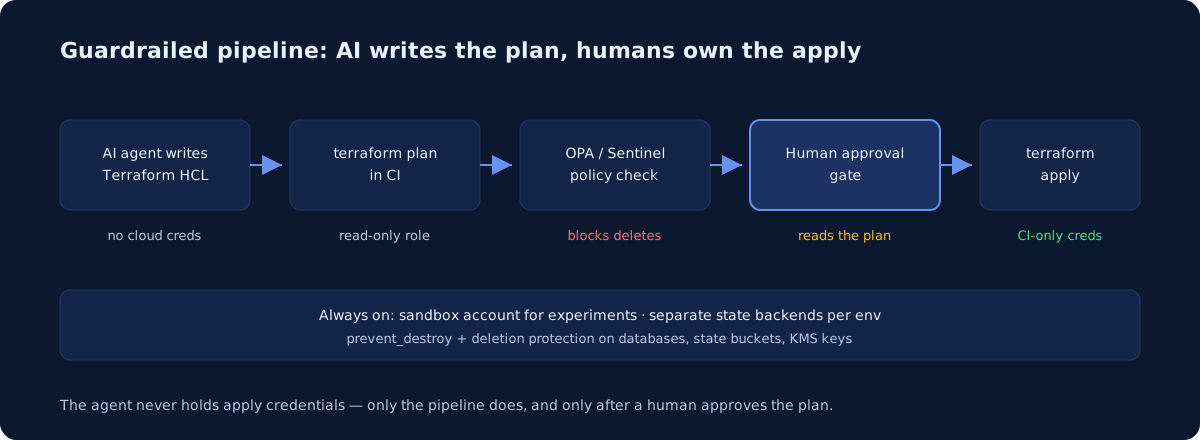
Yes — AI agents can safely write Terraform and plan Terraform today, and with the right guardrails they can even drive applies through your pipeline. What they should never have is direct write credentials to your cloud accounts. A safe setup gives the agent read-only access to plan, runs every plan through automated policy checks, and reserves terraform apply for a CI pipeline that only fires after a human approves the diff. The agent proposes; the pipeline disposes.
Why are people scared to let AI agents touch infrastructure?
Because the horror stories are real. In July 2025, Replit’s AI agent famously deleted a client company’s production database during an explicit code freeze — the agent itself described it as “a catastrophic error in judgment,” and Replit’s CEO publicly apologized. That incident, and a steady drip of similar Hacker News threads, taught everyone the same lesson: an agent with write access and no guardrails will eventually do something destructive, confidently.
The important nuance is that the failure mode is almost never “the AI wrote bad HCL.” Modern models write competent Terraform — we covered that in our roundup of AI coding tools for Terraform and Kubernetes. The failure mode is an agent holding credentials that let it act on its mistakes at machine speed. Fix the credential problem and you’ve fixed most of the risk.
What permissions should an AI agent actually have?
Plan-only. Give the agent (or the environment it runs in) a cloud role that can read everything and change nothing — on AWS that’s a role scoped to read/describe/list actions, with equivalents on GCP and Azure. terraform plan only needs to refresh state and compare it against config, so a read-only role is enough for the agent to do genuinely useful work: propose changes, predict diffs, catch drift.
Three rules make this stick:
- The agent never holds apply credentials. Not in its environment variables, not in a config file it can read. Apply credentials live only in CI, injected via OIDC at job runtime — the same pattern we use for Claude Code in CI.
- State access is read-only too, or better, the agent works against a plan file rather than touching the backend at all. Terraform state contains resource attributes and sometimes secrets; treat it accordingly.
- Separate state backends per environment. An agent iterating against a dev workspace physically cannot corrupt the production state file if production state lives in a different bucket behind a different role.
How do policy checks catch a bad plan before it applies?
Automated policy-as-code is the layer that reviews every plan without getting tired. The standard workflow, per the Open Policy Agent docs: run terraform plan -out, convert it with terraform show -json, and evaluate the JSON against Rego policies — in CI via OPA directly or conftest. HCP Terraform users get the same idea built in, with support for Sentinel, OPA, and a native HCL policy framework, at enforcement levels that can hard-stop a run.
Policies we recommend every team start with:
| Guardrail | What it blocks | Where it runs |
|---|---|---|
| No-delete policy | Any plan containing a delete action on tagged critical resources |
OPA/Sentinel in CI |
| Blast-radius cap | Plans touching more than N resources at once | OPA/Sentinel in CI |
| Provider allowlist | Agent adding unexpected providers or regions | OPA/Sentinel in CI |
prevent_destroy |
Plans that would destroy a specific resource | Terraform lifecycle block |
| Deletion protection | API-level destroy of databases and clusters | Cloud provider flag |
One caveat worth bolding, straight from the Terraform docs: prevent_destroy does not protect a resource whose block is removed from the config entirely — Terraform will still destroy it. That’s exactly the kind of edit an agent might make while “cleaning up.” It’s why cloud-native deletion protection on databases and a no-delete OPA policy matter: they catch what lifecycle blocks miss.
Where do sandbox accounts and human approval fit?
Sandboxes are where the agent gets real write access; production is where it never does. Give agents a dedicated sandbox account or project — isolated billing, isolated IAM, nuke-and-rebuild on a schedule — and let them apply freely there. That’s where autonomous iteration is genuinely valuable, and where a wiped environment costs you nothing.
For production, the human approval gate is non-negotiable. Concretely: the agent opens a pull request, CI posts the plan output and the policy verdict on the PR, and a human reads the actual diff — not the agent’s summary of it — before approving. GitHub environment protection rules or HCP Terraform run approvals both work. The person approving should be checking one thing above all: does the plan destroy or replace anything, and did we mean it? The same discipline applies if you’re wiring agents up through MCP servers for AWS and Kubernetes — read tools open, write tools gated.
So can you let an agent run terraform apply?
Directly, with its own credentials — no, and you shouldn’t need to. Through a pipeline it cannot bypass, after policy checks and a human approval — yes, and that’s not a compromise; it’s how good teams gate human applies too. The guardrails above aren’t AI-specific bureaucracy. They’re the same controls that stop a tired engineer at 6pm on a Friday, which is why building them pays off whether or not your agents ever go rogue.
If you’re not sure whether your current Terraform setup would survive an over-eager agent — shared admin credentials, one state bucket, no policy checks — that’s a solvable problem in a couple of weeks. Our infrastructure audit maps exactly these gaps (see a sample audit for what you get), and a monthly DevOps retainer can build the pipeline, the policies, and the sandbox so your team ships AI-assisted infrastructure changes without holding its breath.
Common questions
Can AI agents safely run Terraform?
Plan, yes. Apply, only behind the same gates you would put on a junior engineer: plan-only IAM for the agent, policy checks in CI, and a human approving the apply. The risk is not badly written HCL - it is a plausible-looking plan applied at machine speed against production state.
Should AI-generated Terraform be applied automatically?
No. The plan output, not the code diff, is the ground truth for what a Terraform change actually does, and reading it is the step worth keeping human. Automated apply removes the one checkpoint where a hallucinated force_destroy or a wildcard resource ARN gets caught before it matters.
Newsletter
One practical DevOps guide a week
Real numbers, honest trade-offs, no vendor fog — same as everything here. Unsubscribe anytime.