Guides · AI & DevOps · ai-tools · terraform · kubernetes
Best AI Coding Tools for Terraform and Kubernetes Work
· 5 min read
For infrastructure-as-code work, the honest answer is that agentic terminal tools — Claude Code and OpenAI Codex CLI — fit Terraform and Kubernetes better than editor-first tools, because IaC is a run-and-read-output loop, not a typing problem. Cursor is the strongest pick if your team lives in an editor anyway, GitHub Copilot is the cheapest way to get value inside an existing GitHub workflow, and Google Antigravity is the free option worth watching but not yet the one we’d standardize a client on. There is no overall winner: the right choice depends on how your team runs terraform plan and who is allowed to run apply.
What actually matters when AI touches Terraform or Kubernetes?
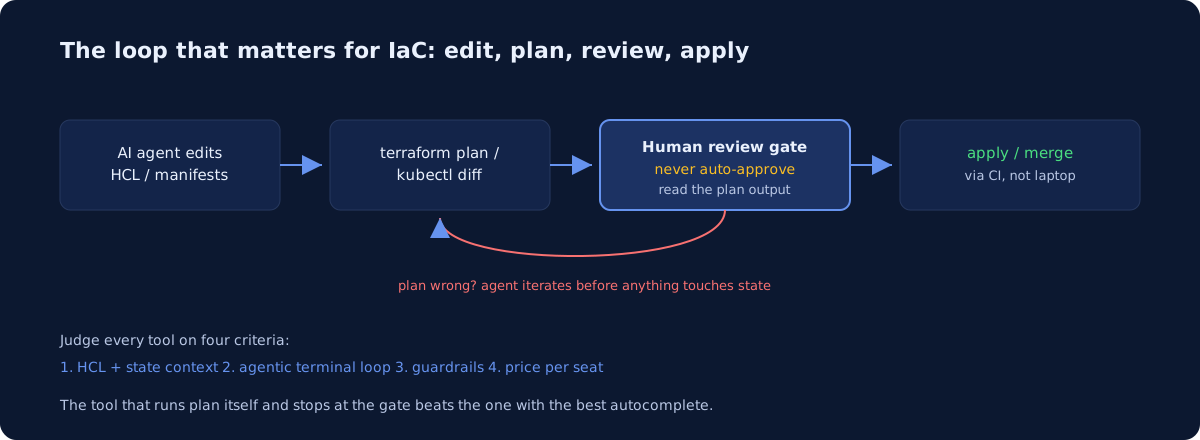
Four criteria separate these tools for IaC work, and none of them is “writes the prettiest HCL.” All five tools produce plausible Terraform now; the differences show up in the loop around the code. We evaluate on: context handling (does it understand module structure, variables, and what state implies without being told), agentic terminal access (can it run terraform plan, kubectl diff, or helm template itself and read the output), guardrails (permission prompts, allowlists, sandboxing before it runs anything destructive), and price per seat.
Context matters more in IaC than in app code because the blast radius is bigger. A hallucinated attribute in application code fails a unit test; a hallucinated force_destroy = true on an S3 bucket fails in production. The terminal loop matters because the plan output — not the diff — is the ground truth for what a Terraform change does.
| Tool | Terminal agent loop | Guardrails | Price (individual) |
|---|---|---|---|
| Claude Code | Native — runs plan, reads output, iterates | Per-command permission prompts, allowlists, hooks | $20/mo (Pro), Max from $100/mo |
| Cursor | Agent mode with terminal access in-editor | Approval prompts, command allow/deny lists | $20/mo (Pro), Teams $40/user |
| GitHub Copilot | Agent mode + CLI; cloud coding agent opens PRs | PR-based flow is itself a guardrail | $10/mo (Pro), Pro+ $39/mo |
| OpenAI Codex | CLI and cloud agent; sandboxed execution | Approval modes, sandbox by default | Included in ChatGPT Plus $20/mo |
| Google Antigravity | Agent-first IDE + CLI, browser-in-the-loop | Agent manager review surfaces | Free for developers (per Google’s site) |
Prices are per the vendors’ published pricing pages as of August 2026 and change often — check before budgeting.
Which tool handles HCL context and state awareness best?
Claude Code and Codex CLI are the strongest fit for large Terraform repos, because they explore the repo agentically — grepping for module sources, reading variables.tf, checking backend config — rather than relying on an embedding index of whatever files are open. Cursor’s codebase indexing is genuinely good for monorepos, and for a repo with forty modules it can surface the right one faster than an agent that has to go look.
The catch for every tool: none of them sees your state file, and none should — state contains secrets. That means all of them will confidently propose changes that plan reveals to be destroys-and-recreates. This is why the terminal loop criterion dominates: a tool that runs terraform plan and reads the result corrects itself; a tool that only writes HCL ships you the surprise. Repo-level instruction files narrow the gap for all five — we cover the format wars in AGENTS.md vs CLAUDE.md vs Cursor rules, and what good Terraform module hygiene looks like on its own page.
Can any of these safely run plan and apply loops?
Plan, yes — apply, only with real guardrails, and never unattended against production. Claude Code’s permission system prompts per command and supports allowlists, so the sensible pattern is: terraform plan, terraform validate, kubectl get, and kubectl diff allowlisted; apply, destroy, and kubectl delete always prompting. Codex CLI runs sandboxed with approval modes, which is a similar posture. Cursor’s agent can run terminal commands with allow/deny lists, but its full-auto mode is easy to over-grant in an IaC repo. Copilot’s cloud coding agent sidesteps the question by working in a branch and opening a PR — for Kubernetes manifests especially, that PR-gated flow is a guardrail by construction.
The verdict: let agents run read-only and plan commands freely; route every apply through CI with a human approval step. The full guardrail stack is in Can AI agents safely run Terraform?
What should a 5-25 engineer startup actually pick?
Per-scenario, not per-winner:
- Terraform-heavy, terminal-comfortable team: Claude Code at $20/seat. The plan/read/iterate loop is the core workflow, and the hooks system supports policy checks before any command runs.
- Team already in VS Code or a monorepo: Cursor Pro. Best in-editor experience, strong indexing; lock down the terminal permissions on day one.
- Budget-first, GitHub-native: Copilot Pro at $10/seat, using the coding agent’s PR flow for infra changes. Cheapest credible option.
- Already paying for ChatGPT: Codex CLI is effectively included in Plus at $20/mo — try it before adding another subscription.
- Experimenting, price-sensitive: Antigravity is free per Google’s published pricing, and its agent-manager model is interesting for parallel work. Our fuller take is in Google Antigravity for DevOps work.
Mixing is fine. Running Copilot for autocomplete alongside Claude Code for infra tasks pairs the cheap tool with the careful one.
Whichever you pick, the tool writes the Terraform — it doesn’t own the consequences. If AI has been writing your infrastructure code for six months, the honest question is whether a human who knows what plan output means has read it recently. That’s exactly what our $1,900 infrastructure audit covers, across AWS, GCP, and Azure — see the pricing page for what’s included, or look at a sample audit first.
Common questions
What are the best AI coding tools for Terraform and Kubernetes?
Agentic terminal tools - Claude Code and OpenAI Codex CLI - fit infrastructure work best, because IaC is a run-and-read-output loop rather than a typing problem. Cursor is the strongest pick if your team already lives in an editor, and GitHub Copilot is the cheapest way to add value inside an existing GitHub workflow. There is no overall winner.
Is Cursor good for Terraform and Kubernetes work?
Cursor is the strongest option if your team works in an editor all day, and it handles module structure and repository context well. The tradeoff against agentic terminal tools is the plan-and-read loop: infrastructure changes are judged on terraform plan output, and editor-first tools are less naturally shaped around running a command and reading its result.
Does GitHub Copilot work well for DevOps work?
It is the cheapest way to get value if your team already works inside GitHub, and it produces credible Terraform and Kubernetes manifests. The limits show up on agentic paths: GitHub's documentation states that Copilot CLI and agent mode in Copilot Chat do not support content exclusion, so secret hygiene needs separate layers.
How does Codex CLI compare for infrastructure work?
Codex CLI sits in the same category as Claude Code: an agentic terminal tool that can run terraform plan or kubectl diff itself and read the output. That loop is what matters for IaC. Choose between them on guardrails and how your team already works, rather than on generated-code quality, which is broadly comparable.
Newsletter
One practical DevOps guide a week
Real numbers, honest trade-offs, no vendor fog — same as everything here. Unsubscribe anytime.