Guides · AI & DevOps · ai-tools · antigravity · guardrails
Google Antigravity for DevOps Work: An Honest First Look
· 6 min read
Google Antigravity is a free, agent-first development platform — since the 2.0 release it is a standalone desktop app plus a CLI and SDK, not just an IDE — and it is genuinely interesting for DevOps work because of its parallel agent manager, browser-in-the-loop debugging, and a real permission engine. Our honest verdict: worth a pilot on non-production repos, not yet what we’d standardize a client’s infrastructure workflow on. The price is unbeatable, but the operational track record Claude Code and Cursor have accumulated on infra tasks is the one thing a new platform cannot ship in a release.
What is Google Antigravity in mid-2026?
Antigravity started as Google’s agentic IDE and has since split into a product family. The May 2026 Antigravity 2.0 release turned it into a standalone desktop app (macOS, Linux, Windows) built around an agent manager rather than an editor, with the IDE, a terminal-first CLI, and a Python SDK as siblings. Agents run in parallel, can spawn subagents, run on cron schedules, and drive a Chrome browser as part of their loop.
Model choice is broader than you might expect from Google: alongside the Gemini 3.x line (3.7/3.6/3.5 Flash and 3.1 Pro), the docs list Claude Sonnet 4.6, Claude Opus 4.6, and GPT-OSS-120b as selectable models. Pricing is the headline: the individual tier is free with weekly rate limits, paid Google AI Pro/Ultra tiers raise those limits, and an organization plan runs through Google Cloud with consumption-based pricing — all per Google’s published pages, which change often.
How does it compare to Cursor and Claude Code for infra tasks?
For Terraform and Kubernetes work, the three tools sit in different places: Claude Code is the terminal-native agent, Cursor is the editor-first agent, and Antigravity is the agent-manager platform that treats the editor as one surface among several. Infrastructure work is a run-and-read-output loop — terraform plan, kubectl diff, read, iterate — and all three can drive it. The differences are maturity and workflow shape; see our AI coding tools for Terraform and Kubernetes roundup.
| Antigravity | Claude Code | Cursor | |
|---|---|---|---|
| Workflow shape | Parallel agents in a manager UI + CLI | Terminal-first agent | Editor-first agent mode |
| Guardrails | Deny/Ask/Allow engine, sandbox in preview | Permission prompts, allowlists, hooks | Allow/deny lists, YOLO toggle |
| Distinct strength | Free tier, browser-in-the-loop, scheduled agents | Longest agentic track record on infra loops | Best if the team lives in an editor |
| Open question | Enterprise data-governance detail, infra track record | Price at heavy usage | Terminal loop is secondary |
Where Antigravity is distinctive for DevOps specifically: the browser-in-the-loop agent can check a Grafana dashboard or a cloud console page as part of a task, and scheduled agents invite “check the drift every morning” automations. Where it lags: community knowledge for infra tasks is thin compared to what exists for Terraform workflows in Claude Code and Cursor, and things like fine-grained hooks around plan/apply are patterns we can verify work today in Claude Code but haven’t yet seen proven out in Antigravity at client scale.
What does Antigravity’s permission system actually control?
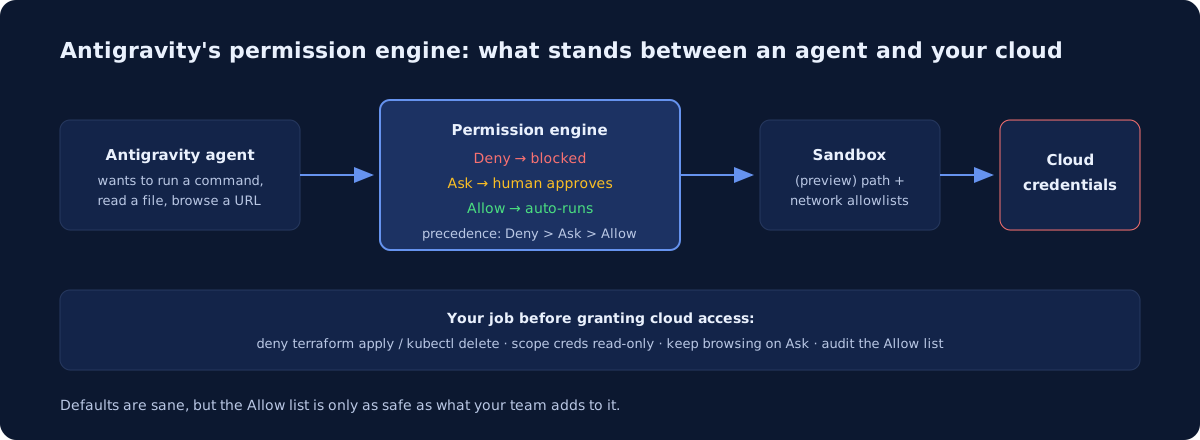
The permission engine is the most load-bearing part of the product for infrastructure work, and it is more granular than the first-release Antigravity was. Per Google’s docs, every agent action is evaluated against three tiers — Deny, Ask, Allow — with Deny taking precedence — across six action types: file reads/writes, URL reads, interactive browser execution, terminal commands, MCP tool calls, and unsandboxed execution.
The details that matter for cloud work:
- Terminal commands match by prefix or regex, so you can allow
terraform planwhile denyingterraform applyandkubectl deleteoutright. - Web browsing defaults to Ask for both fetching and interactive automation — a sane default, since browser access is a classic data-exfiltration path for prompt-injected agents.
- Terminal sandboxing is in preview: granted file paths become the sandbox filesystem allowlist and granted URL domains become its network policy. Preview status is worth respecting — treat it as a second layer, not the layer.
- Projects carry their own isolated security policies, and agents can run in isolated Git worktrees rather than your live checkout.
That is a credible design. The caveat is that Allow lists are only as safe as what your team puts on them, and an agent that can edit files in a repo can often reach the same outcome a denied command would have.
What should you check before it touches cloud credentials?
The same checklist we apply to any agentic tool applies here — it’s simply what “new platform” means operationally. Before an Antigravity agent runs with AWS, GCP, or Azure credentials in reach:
- Scope the credentials, not just the tool. Give the agent’s environment a read-only role; keep
apply-capable credentials in CI behind human-approved PRs — the pattern we detail in can AI agents safely run Terraform? - Write the Deny list first:
terraform apply,terraform destroy,kubectl delete,aws iam *, and their equivalents. Audit what teammates have added to Allow. - Keep browser actions on Ask. Browser-in-the-loop is the feature most exposed to prompt injection from page content.
- Keep secrets out of the workspace entirely — env files and cloud config directories are readable by anything with file access. Our guide to keeping secrets out of AI coding tools covers the mechanics.
- Resolve the governance questions in writing. We could not find published answers on Google’s Antigravity site for training-on-your-code policies per tier or compliance attestations for the free tier — for a SOC 2-bound startup, get those answers from the organization plan’s terms before rollout, not after.
Should your team adopt it now?
Pilot it — the free tier makes the experiment nearly costless — but pilot it the way you’d onboard a new engineer: non-production repos first, read-only credentials, deny lists written before day one. If it holds up, the agent manager and scheduled tasks are a real workflow, not a gimmick. If your team is already productive in Claude Code or Cursor, nothing here justifies a migration yet.
This is the kind of evaluation we run for clients as part of an infrastructure audit: which AI tooling to sanction, with what guardrails, on which cloud — AWS, GCP, or Azure. If nobody on the team owns that question, that’s a gap worth closing before the agents multiply.
Newsletter
One practical DevOps guide a week
Real numbers, honest trade-offs, no vendor fog — same as everything here. Unsubscribe anytime.