Guides · AI & DevOps · ai-tools · secrets · security
How to Keep Secrets Out of AI Coding Tools
· 5 min read
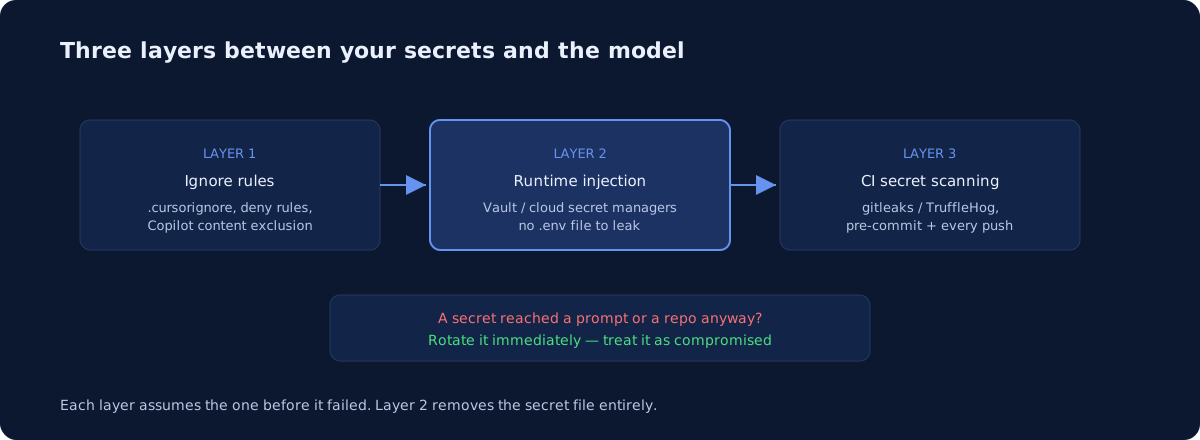
Keeping secrets out of AI coding tools takes three layers, not one. First, exclude secret-bearing files from the tool’s context with ignore files and content-exclusion settings. Second, stop putting secrets in files at all — inject them at runtime from Vault or your cloud’s secret manager so there is nothing on disk to leak. Third, run secret scanners like gitleaks or TruffleHog in CI as the backstop, because ignore rules have documented gaps. Any single layer fails; the stack of three holds up well.
Do AI coding tools actually read your .env files?
By default, mostly no — but the exceptions are where leaks happen. Cursor’s docs state that **/.env and **/.env.* are automatically ignored, alongside your .gitignore entries. The problem is what ignore rules don’t cover: Cursor’s own documentation notes that the terminal and MCP server tools used by Agent cannot block access to code governed by .cursorignore. An agent that runs cat .env in your terminal has your secrets in context, ignore file or not.
The same class of gap exists elsewhere. GitHub’s docs state that Copilot CLI and agent mode in Copilot Chat do not support content exclusion — the exclusion feature applies to code completion and regular chat, not the agentic paths. Agentic tools are exactly the ones most likely to open arbitrary files, so treat ignore rules as the first layer, never the only one. If agents are also touching your infrastructure, the same thinking applies to MCP servers for AWS and Kubernetes.
Which ignore configs should you set up?
Set up the native exclusion mechanism for each tool your team runs, and commit the config so it applies to everyone. For Cursor, a .cursorignore in the repo root uses gitignore syntax and blocks files from Agent, Tab, Inline Edit, and @-mentions:
# .cursorignore
.env*
*.pem
*.key
terraform.tfstate*
kubeconfig*
secrets/
Terraform state deserves emphasis: terraform.tfstate contains resource attributes in plaintext, frequently including database passwords — it should never be local, and never in AI context. Cursor’s separate .cursorindexingignore only affects search indexing — it is not a secrets control.
For GitHub Copilot, content exclusion is configured in repository or organization settings (org-level rules can cover every repo with patterns like "*": ["**/.env"]), uses fnmatch patterns, and per GitHub’s docs takes up to 30 minutes to propagate to IDEs. For Claude Code, deny-rules in .claude/settings.json can block file reads by pattern, and the same file travels with the repo — we cover the team-config angle in AGENTS.md vs CLAUDE.md vs Cursor rules.
How do you inject secrets at runtime instead of files?
The stronger move is making the .env file not exist. If secrets live only in a secret manager and enter the process as environment variables at launch, there is nothing for an AI tool to read, commit, or paste into a prompt. Every cloud has a native option — AWS Secrets Manager, GCP Secret Manager, Azure Key Vault — and HashiCorp Vault covers the multi-cloud case.
Concretely, replace source .env in local development with a wrapper that resolves secrets at startup: aws secretsmanager get-secret-value piped into the environment, vault kv get, or a tool-agnostic runner like 1Password’s op run or Doppler that injects variables around the process. In Kubernetes, External Secrets Operator syncs from the cloud secret manager so manifests reference a secret name, never a value. The pattern that matters is the same everywhere: code and repos hold references; only the running process holds values. This is also what a SOC 2 auditor wants to see — centralized secrets with access logging — which we map out in our SOC 2 look at AI coding assistants.
What should scan for secrets in CI?
Run one of the two standard open-source scanners on every push, plus a pre-commit hook so secrets never leave the laptop. Both are mature; they differ in emphasis:
| gitleaks | TruffleHog | |
|---|---|---|
| License | MIT | AGPL-3.0 (v3) |
| Detection | Regex + entropy rules | 700+ detectors |
| Verification | Flags candidates | Can check if a secret is live |
| Git history | Yes (git log -p based) |
Yes, plus buckets, images, more |
| CI | gitleaks/gitleaks-action |
Official GitHub Action |
TruffleHog’s live-verification is the standout: per its docs it can attempt to authenticate with a detected credential and report it as verified or unverified, which turns a noisy finding into a page-someone finding. A minimal GitHub Actions job:
- uses: actions/checkout@v4
  with:
    fetch-depth: 0
- uses: gitleaks/gitleaks-action@v2
  env:
    GITHUB_TOKEN: ${{ secrets.GITHUB_TOKEN }}
Both tools also ship pre-commit hooks — add one to .pre-commit-config.yaml and the common failure mode (AI assistant helpfully hardcodes a key, developer commits it) dies locally. If Claude Code itself runs in your pipelines, harden that too: see our locked-down GitHub Actions setup.
What do the tool vendors log and retain?
Less than most teams fear, more than zero — and it varies by plan, so check the tier you actually pay for. Anthropic’s Claude Code docs state that for commercial users (Team, Enterprise, API) prompts and code are not used for training unless you opt in, with a 30-day standard retention and zero-data-retention available to qualified enterprise accounts. Consumer plans differ sharply: retention is 5 years if you allow training, 30 days if you don’t. Cursor’s security page says Privacy Mode means “we will not train on your data,” backed by contractual terms with its model providers. Copilot’s exclusions govern what leaves the editor at all.
The operational takeaway: put every seat on a business tier with training disabled, turn privacy modes on by policy, and remember that vendor retention is irrelevant for a secret — once a credential has been sent to any third party, rotate it. Treat “it was only in the prompt” as a leak.
Where should you start?
Start by finding out what is already exposed: run gitleaks against full git history today — most teams that have never scanned find something. Then add the ignore configs, move one service to runtime injection as the template, and wire scanning into CI. This is a focused week of work, and it is exactly the kind of thing our infrastructure audit flags with specific remediations — or grab the sample audit to see how we report secret-handling findings. We do this across AWS, GCP, and Azure, and the layered pattern above is identical on all three.
Common questions
Do AI coding tools see my secrets?
By default mostly no, but the exceptions are where leaks happen. Cursor ignores .env files automatically, yet its own documentation notes that the terminal and MCP tools used by Agent cannot block access governed by .cursorignore. An agent that runs cat .env has your secrets regardless. Treat ignore rules as the first layer, never the only one.
Newsletter
One practical DevOps guide a week
Real numbers, honest trade-offs, no vendor fog — same as everything here. Unsubscribe anytime.