Guides · AI & DevOps · claude-code · github-actions · ai-security
Claude Code in GitHub Actions: Setup, Triggers, and Hardening
· · 12 min read
The fastest way to connect Claude Code to GitHub is to run /install-github-app from Claude Code inside the repository you want to wire up. That single command installs the Claude GitHub App, stores your authentication secret, and opens a pull request containing the workflow file. Merge it, and @claude works in your issues and pull requests.
That gets you running in about five minutes. The rest of this guide covers what the quick setup doesn’t decide for you: which permissions you just granted, who is allowed to trigger a run, how the runner should authenticate to your cloud, and where the spend and security limits belong. The official action ships sensible defaults — a write-access check on the triggering user and a bot-actor block — but the hardening around the runner is yours to own.
How do you connect Claude Code to GitHub?
There are two supported paths, and both need admin access to the repository.
Quick setup. Install the GitHub CLI and run gh auth login first — Claude Code checks for it and warns you if it is missing. Then open claude in the repository and run /install-github-app. Claude Code installs the App, then saves a credential as a repository secret: ANTHROPIC_API_KEY if you authenticate with a Claude API key, or CLAUDE_CODE_OAUTH_TOKEN if you authenticate with a Claude subscription. It pushes a branch with the workflow files you select and opens a pull request ready to create.
Manual setup. Use this when you don’t run Claude Code locally, or when you want control over the workflow files:
- Install the Claude GitHub App on the repository.
- Add either
ANTHROPIC_API_KEYorCLAUDE_CODE_OAUTH_TOKENas a repository secret. Generate the OAuth token by runningclaude setup-tokenlocally; it works on Pro, Max, Team, and Enterprise plans. - Copy
examples/claude.ymlinto.github/workflows/. It is a working workflow, not a sketch.
In the workflow, the secret maps to the matching input: anthropic_api_key for an API key, claude_code_oauth_token for a subscription token.
Not on GitHub? The equivalent on GitLab is lower-level and still in beta — Claude Code in GitLab CI/CD covers what you assemble yourself.
Private repositories are the simpler case here, not the harder one. The App install and secret work identically, and the fork-secret problem described further down applies only to public repos.
What permissions does the Claude GitHub App actually request?
This is the part worth reading before you click approve, because GitHub does not let you accept a subset. The Claude GitHub App is shared across several Claude products — the Action, Code Review, and web auto-fix — so its permission set is the union of what all of them need:
| Permission | Access | Used by the Action? |
|---|---|---|
| Contents | Read and write | Yes |
| Issues | Read and write | Yes |
| Pull requests | Read and write | Yes |
| Actions | Read and write | — |
| Checks | Read and write | — |
| Discussions | Read and write | — |
| Members | Read | — |
| Metadata | Read | — |
| Repository hooks | Read and write | — |
| Statuses | Read | — |
| Workflows | Read and write | — |
Only the first three are what claude-code-action relies on. If your security review won’t clear the rest, the documented escape hatch is to create a custom GitHub App with just Contents, Issues, and Pull requests and point the workflow at that instead. The tradeoff is real: a custom app covers only the Action, so Code Review and web auto-fix still require the official one.
One more thing worth knowing operationally: when the App later requests a permission it didn’t have before, GitHub prompts the account owner to approve it, and the installation keeps its old permissions until they do. Nothing silently escalates, but a pending approval can look a lot like a broken integration.
What triggers a run, and who is allowed to?
The action infers its mode from your workflow rather than from a mode input:
- Interactive mode — no
promptinput. Claude waits for the trigger phrase (@claudeby default, configurable withtrigger_phrase) in an issue comment, a PR comment, a PR review, or the title or body of a newly opened issue. Progress appears as a comment on the triggering thread. - Automation mode — a
promptinput is present. Claude runs without waiting for a mention, on any GitHub event includingschedule. Results go to the workflow run log unless the prompt directs Claude to post and it has a tool that can. Deciding what is worth running unattended is the harder half: see what to actually automate with Claude Code.
Two checks run against the triggering actor in both modes, and a run fails if either rejects it:
- Write access. On issue and PR events the triggering user must have write access to the repository. To allow specific users without it, set
allowed_non_write_usersand pass your owngithub_token. Events that no user authors — ascheduletrigger — skip this check. - Human actor. Bot actors are rejected unless listed in
allowed_bots. This is what stops two bots triggering each other in a loop. It also catches scheduled runs, which GitHub attributes to a repository user — usually whoever last edited thecronline. If that account is a bot, it needs to be inallowed_bots.
Scheduled workflows carry two GitHub-side constraints that surprise people: they run only from the default branch, and on public repositories GitHub disables the schedule after 60 days without repository activity.
What does a hardened workflow look like?
Start from the official action rather than a hand-rolled curl loop, then tighten the job around it.
jobs:
  claude:
    if: contains(github.event.comment.body, '@claude')
    runs-on: ubuntu-latest
    timeout-minutes: 15
    concurrency: claude-${{ github.ref }}
    permissions:
      contents: write
      pull-requests: write
      issues: write
      id-token: write
      actions: read
    steps:
      - uses: actions/checkout@<full-SHA>
      - uses: anthropics/claude-code-action@<full-SHA>
        with:
          anthropic_api_key: ${{ secrets.ANTHROPIC_API_KEY }}
          claude_args: "--max-turns 10 --model claude-sonnet-5"
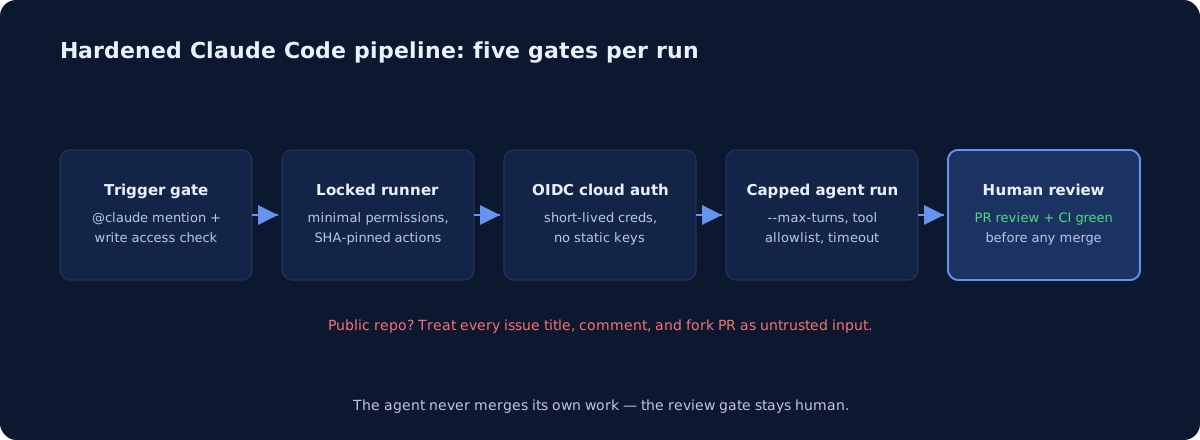
id-token: write is required for the action’s default GitHub App authentication, and actions: read is what lets Claude read CI results on a pull request. The if condition keeps runners from starting on comments that don’t mention @claude — the action checks the trigger phrase itself too, but not before you have paid for the runner minute.
Two habits from GitHub’s own hardening guide apply doubly to agent workflows: pin actions to full commit SHAs, since a tag can be moved by whoever controls the upstream repo, and set the repository default for GITHUB_TOKEN to read-only, granting write scopes per job. We cover the broader pipeline patterns on our GitHub Actions page.
How should the runner authenticate to AWS, GCP, or Azure?
Never with long-lived keys in repository secrets. Use OIDC federation: the workflow exchanges its short-lived identity token for cloud credentials scoped to one role, one repo, ideally one branch. It works the same way on all three clouds, and it means a leaked runner yields credentials that expire in minutes rather than a key that lives until someone notices.
This matters more with an agent on the runner, because the agent can be talked into running commands. Scope the assumed role to exactly what the workflow does — plan-only IAM for infrastructure jobs, no iam:*, no wildcard resource ARNs. If Claude is touching Terraform, pair this with the guardrails in Can AI Agents Safely Run Terraform?.
Anthropic-side auth can go keyless too. Workload identity federation against a Claude Console service account removes ANTHROPIC_API_KEY from secrets entirely — set anthropic_federation_rule_id (an fdrl_... value) and anthropic_organization_id, plus optionally anthropic_service_account_id (svac_...) and anthropic_workspace_id (wrkspc_...). The job needs id-token: write for the exchange even when you pass your own github_token.
Routing inference through your own cloud account is a third option: use_bedrock for Amazon Bedrock, use_vertex for Google Cloud’s Agent Platform, use_foundry for Microsoft Foundry. All three authenticate through OIDC identity federation, so no static cloud credentials sit in the repository. The trust setup differs per cloud and has one trap on public repos — we walk through all three in running Claude Code on Bedrock, Vertex, or Foundry.
How do you cap what a run can cost?
Every run burns two meters: GitHub Actions minutes and API tokens. Cap both in the workflow file so a confused agent can’t loop for an hour.
| Control | Where | What it stops |
|---|---|---|
--max-turns in claude_args |
Action input | Runaway agent iterations |
timeout-minutes on the job |
Workflow | Hung runs burning minutes |
concurrency group |
Workflow | Parallel runs stacking up |
--model selection |
claude_args |
Paying flagship rates for triage tasks |
| Workspace spend limits | Claude Console | Monthly blast radius |
Set --max-turns and timeout-minutes on day one. Anthropic’s cost guidance adds the softer levers: specific requests, issue templates that supply context up front, and a concise CLAUDE.md, since Claude reads it on every run. If you authenticate with an OAuth token, runs draw on your Claude subscription instead of API billing. For most teams the token bill is small next to the engineering hours saved — the real risk is the unbounded tail, and caps remove it.
What about prompt injection on public repos?
This is the sharpest risk. In interactive mode the agent reads issue and PR text as instructions, so on a public repo anyone’s comment is potential input. The write-access check blocks drive-by triggering, but injection can hide inside content a maintainer legitimately asks Claude to process — an issue body, a dependency’s README, a linked page.
Defenses that hold:
- Keep secrets away from forks. GitHub already withholds secrets from fork-triggered runs on public repositories; don’t undo that with
pull_request_targetplus a checkout of untrusted code, the exact pattern GitHub’s guide warns against. - Route untrusted text through environment variables, never string-interpolated into
run:scripts — standard script-injection hygiene that predates AI. - Restrict tools. With a plain-text prompt in automation mode, Claude has no shell or GitHub API access until you grant it via
--allowedToolsinclaude_argsor apermissions.allowrule in thesettingsinput. Grant the narrowest list the job needs. - Assume compromise in the blast-radius math. If an injected instruction wins, what can this runner’s token and cloud role actually do? Least privilege is the real defense, not prompt phrasing.
If you’re on a SOC 2 track, auditors are starting to ask exactly these questions — see our AI assistants and SOC 2 breakdown.
Do you still need a human review gate?
Yes, and it’s non-negotiable. The agent opens PRs; humans merge them. Enforce it with branch protection: required reviews, required status checks, no direct pushes to main — for anyone, agent included.
One operational quirk decides whether that gate means anything. GitHub does not trigger workflows on commits made with the default GITHUB_TOKEN. If you pass github_token: ${{ secrets.GITHUB_TOKEN }} to the action, remove it so it authenticates as the Claude GitHub App, or pass a custom app token instead. Otherwise your CI never runs on the agent’s commits, and a review gate over a PR whose tests never ran is theater.
The pattern that works: agent proposes, CI verifies, human approves. Same shape we recommend for AI agents touching Kubernetes.
How do you roll this out across an organization?
Both setup paths configure one repository at a time. For an org-wide rollout:
- Install the Claude GitHub App once at the organization level, choosing all repositories or a selected list.
- Store the authentication secret as an organization-level Actions secret so each repo doesn’t carry its own copy.
- Add the workflow to each repository, or define the job once as a reusable workflow that each repository calls.
For a shared secret, use an API key rather than an OAuth token. An OAuth token is tied to the subscription of whoever ran claude setup-token, which makes it a poor fit for shared infrastructure and a worse one when that person leaves. Better still, skip the long-lived secret entirely and use the workload identity federation inputs above.
If your workflows still reference anthropics/claude-code-action@beta, four changes migrate them to v1: change @beta to @v1, drop the mode input (the action now detects mode from whether prompt is present), rename direct_prompt to prompt, and move CLI options like max_turns and model into claude_args. custom_instructions has no same-name flag and becomes --append-system-prompt.
The three failures teams actually hit
@claude does nothing. Check that the App is installed on this repository, that Actions are enabled for it, and that the secret exists. Then check the comment itself: the trigger must be @claude as a complete word — /claude and @claude-bot don’t match. Finally, confirm the commenting user has write access.
CI doesn’t run on Claude’s commits. Almost always the GITHUB_TOKEN issue above. Also confirm your CI workflow’s triggers include the events Claude’s pushes produce, such as push or pull_request.
Authentication errors. Test the key or token locally with claude before debugging the workflow — it separates a bad credential from a bad workflow file in one step.
Who should own this setup?
Someone has to own the IAM roles, the branch protection, the spend caps, and the quarterly review of what the agent is allowed to do — and at 5-25 engineers that’s rarely a full-time job. This is exactly the kind of leverage-heavy, part-time platform work senior DevOps on retainer covers well. If you already have agent workflows running and want a second set of eyes on the permissions and injection surface, our infrastructure audit includes CI/CD hardening review.
Setup mechanics, action inputs, and App permissions in this guide follow Anthropic’s Claude Code GitHub Actions documentation; runner hardening follows GitHub’s security-hardening guide for GitHub Actions.
Common questions
Can you connect Claude Code to GitHub?
Yes. Run /install-github-app from Claude Code inside the repository. It installs the Claude GitHub App, saves your credential as either ANTHROPIC_API_KEY or CLAUDE_CODE_OAUTH_TOKEN, and opens a pull request containing the workflow file. Merge it and @claude works in issues and pull requests. You need admin access to the repository.
Does Claude Code work on private repositories?
Yes, and private repos are the simpler case. The App install and the secret work identically. The fork-secret problem affects public repositories only, where GitHub deliberately withholds secrets from fork-triggered runs.
How do you stop a Claude Code run in CI costing too much?
Cap both meters in the workflow file. Set max-turns in claude_args to bound agent iterations and timeout-minutes to bound runner minutes. Add a concurrency group so parallel runs cannot stack up, select a cheaper model for triage tasks, and set workspace spend limits in the Claude Console as the backstop.
Newsletter
One practical DevOps guide a week
Real numbers, honest trade-offs, no vendor fog — same as everything here. Unsubscribe anytime.