Guides · AI & DevOps · kubernetes · ai-agents · mcp
Can an AI Agent Manage Your Kubernetes Cluster?
· 5 min read
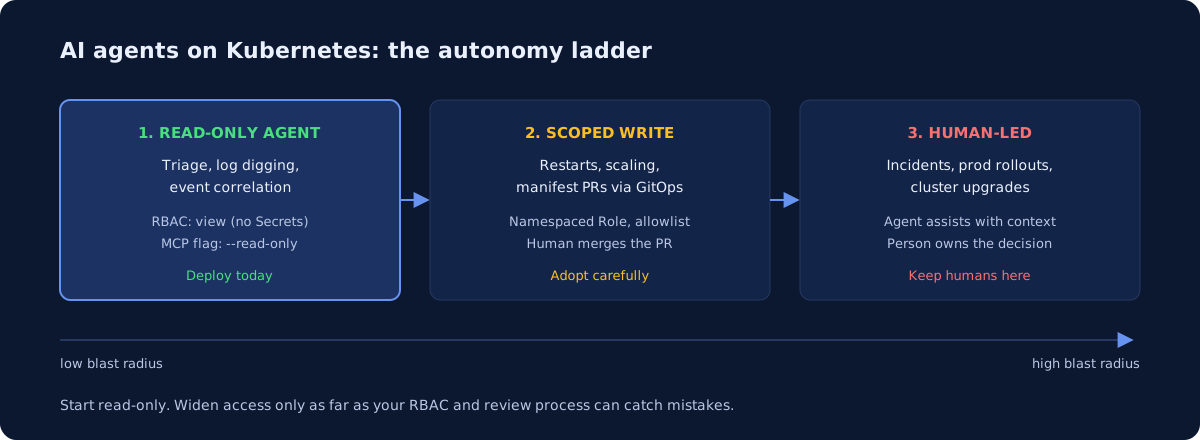
Yes — for reading, and only cautiously for writing. An AI agent with read-only cluster access is genuinely useful today: it can triage a failing rollout, dig through logs and events, and explain what changed faster than most engineers can type kubectl commands. Give the same agent write access and the calculus flips: one confidently wrong kubectl delete or a bad patch applied at machine speed can turn a warning into an outage. The sane setup treats agent access as a ladder — read-only by default, narrowly scoped writes where the payoff is clear, and humans owning anything with real blast radius.
What are read-only agents actually good at?
Triage and investigation — the work that eats on-call evenings. A read-only agent can list pods across namespaces, pull logs from the five containers that matter, correlate events with a deploy timestamp, and summarize “the OOMKilled pods all belong to the ReplicaSet created 20 minutes ago” in seconds. This is the boring, high-volume half of cluster operations, and it is exactly the half language models handle well.
The tooling is mature enough to use. Community MCP servers such as containers/kubernetes-mcp-server talk to the Kubernetes API directly and ship an explicit --read-only flag, plus a --disable-destructive mode that permits reads but blocks deletes and updates. On the diagnosis side, K8sGPT codifies SRE experience into analyzers for Pods, Deployments, Services, Ingresses, Nodes, and more, then explains findings in plain English through your choice of AI backend. Wire either into Claude Code or your assistant of choice and you have a capable first responder that cannot break anything.
Concretely, read-only agents shine at:
- Incident triage: “why is checkout returning 503s?” answered with pod status, events, and recent rollout history in one pass.
- Log digging: filtering thousands of lines down to the stack trace that matters.
- Drift and config review: comparing what is running against what the manifests in Git say should be running.
If your team runs on managed Kubernetes, this pairs naturally with the platform work covered on our Kubernetes page.
How should you scope RBAC for an agent?
Give the agent its own ServiceAccount, bind it to the built-in view ClusterRole (or a namespaced Role), and treat that identity like any other credential. Never let an agent piggyback on an engineer’s admin kubeconfig — you lose audit trails and the blast radius becomes whatever that engineer can do.
Kubernetes makes the read-only tier easy: per the Kubernetes RBAC docs, the default view role grants read access to most namespaced resources but deliberately excludes Secrets, which is exactly the boundary you want for a model that ships transcripts to an API. Defense in depth looks like this:
| Layer | Read-only tier | Scoped-write tier |
|---|---|---|
| Identity | Dedicated ServiceAccount | Separate SA per capability |
| RBAC | view ClusterRole, no Secrets |
Namespaced Role, verb allowlist |
| Tool config | --read-only on the MCP server |
--disable-destructive, no delete |
| Approval | None needed | Human confirms each mutation |
| Environment | Prod OK | Staging first, prod later if ever |
When you do grant writes, scope by verb and resource, not by trust: rollout restart and scale on Deployments in one namespace is a defensible starting allowlist. Better still, route mutations through GitOps — the agent opens a pull request against your manifests, a human merges, Argo CD or Flux applies. The agent never holds apply rights at all; your existing review process becomes the guardrail. We walk through the server-side hardening in MCP Servers for AWS and Kubernetes: A Safe Setup Guide, and the same PR-gated pattern applies to infrastructure code in Can AI Agents Safely Run Terraform?.
Why do incidents still need humans?
Because incidents are exactly the situations where an agent’s failure modes are most expensive. Models are confident under uncertainty, and a Sev-1 is nothing but uncertainty: partial data, misleading symptoms, and stakes that punish a plausible-but-wrong action. A human who half-suspects a fix will hedge — scale one replica, watch the graph. An agent that fully believes a wrong diagnosis executes it cleanly at 2 a.m.
There are also judgment calls no RBAC policy captures: whether to fail over now or ride it out, whether the fix risks data loss, what to tell customers. Keep the agent in the war room as an analyst — summarizing events, checking hypotheses against logs, drafting the timeline — while a person owns every state-changing decision. That division holds up well in practice, and it is the same conclusion we reach in Will AI Replace DevOps Engineers? A 2026 Reality Check: agents compress toil, humans own risk.
What should a small team actually do this quarter?
Deploy the read-only tier now; earn your way toward writes. A funded startup with 5-25 engineers can stand up a dedicated ServiceAccount, a view binding, and a read-only MCP server in an afternoon, and on-call will feel the difference the first time someone asks the agent “what changed?” instead of tab-cycling dashboards.
Hold writes to a higher bar: staging first, verb allowlists, GitOps for anything declarative, and a human approving anything imperative. And keep upgrades, capacity decisions, and incident command with people who carry the pager. If nobody on the team has bandwidth to own that setup — RBAC design, MCP hardening, the GitOps pipeline the agent plugs into — that is a well-shaped project for senior DevOps on retainer: senior hours to build the guardrails, your team to run inside them. A health check is the fastest way to find out whether your current cluster access model is ready for an agent at all.
Common questions
Can AI agents manage Kubernetes?
Yes for reading, cautiously for writing. A read-only agent can triage a failing rollout, pull logs from the containers that matter, and correlate events with a deploy timestamp in seconds. Give the same agent write access and one confidently wrong kubectl delete can turn a warning into an outage. Treat agent access as a ladder, not a switch.
How should you scope RBAC for an AI agent in Kubernetes?
Start read-only and stay there until a specific task justifies more. Community MCP servers such as containers/kubernetes-mcp-server ship an explicit read-only flag plus a mode that permits reads but blocks deletes and updates. When you do grant writes, scope them to one namespace and one clear use case rather than cluster-wide.
Newsletter
One practical DevOps guide a week
Real numbers, honest trade-offs, no vendor fog — same as everything here. Unsubscribe anytime.