Guides · AI & DevOps · mcp · ai-agents · security
MCP Servers for AWS and Kubernetes: A Safe Setup Guide
· 5 min read
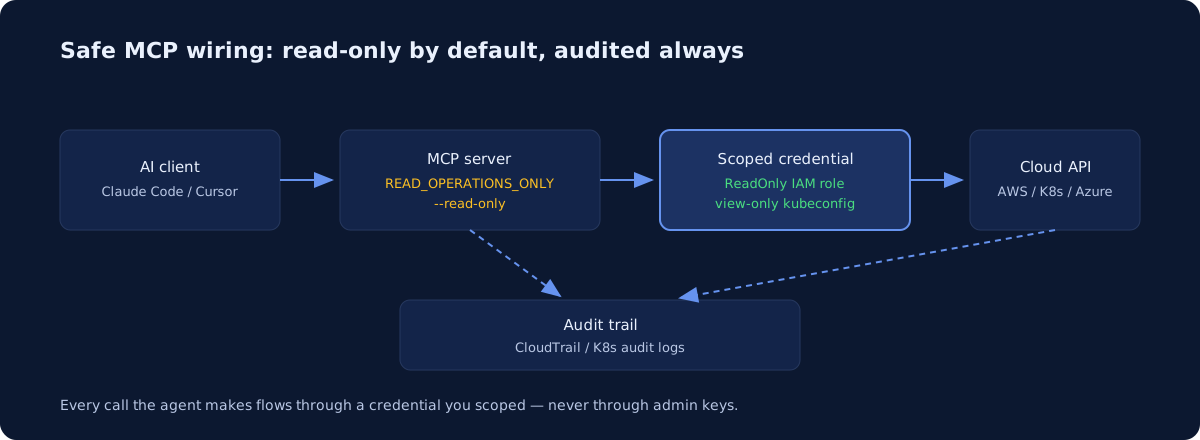
MCP servers let AI assistants like Claude Code and Cursor query your AWS accounts and Kubernetes clusters directly — and yes, you can wire them up safely, provided you treat the MCP server like any other workload identity. The rules are the same ones we apply to every service account: a scoped read-only credential, an explicit deny list for destructive operations, and an audit trail that records every call. The failure mode isn’t MCP itself; it’s teams pointing an agent at admin credentials because that’s what was lying around in ~/.aws/credentials.
What is MCP, in one paragraph?
The Model Context Protocol (MCP) is an open protocol, originally published by Anthropic, that standardizes how AI clients talk to external tools. An MCP server is a small program that exposes typed tools — “describe this EC2 instance”, “get pods in namespace X” — that the AI can invoke. The client (Claude Code, Cursor, VS Code with Copilot) connects to the server, the server holds the actual credentials, and the model never sees your keys directly. That last part is the whole security story: the MCP server’s credential defines the blast radius, not the model’s intentions.
How do you wire an AWS MCP server safely?
Use an official server, give it a dedicated read-only IAM role, and turn on the server’s own read-only enforcement as a second layer. AWS publishes a suite of official MCP servers under awslabs — including an AWS API server, plus servers for EKS, CloudWatch, pricing, and billing — and per AWS’s docs the managed preview offering emphasizes IAM-based permissions and CloudTrail logging.
The setup we recommend:
- A dedicated IAM role or profile for the MCP server — never a human’s credentials, never the account admin. Start from
ReadOnlyAccess, then trim to the services the agent actually needs (a custom policy scoped to describe/list/get actions, with region conditions where sensible). - Server-side read-only enforcement. The AWS API MCP Server supports a
READ_OPERATIONS_ONLYenvironment variable that restricts execution to non-write operations, and aREQUIRE_MUTATION_CONSENToption that forces explicit approval before any write. Set the first one. AWS’s own docs are clear that IAM remains the primary control and these are an additional layer — use both. - One caveat from AWS’s documentation worth repeating: some read-only AWS operations can still return credentials or sensitive values in their output. A read-only role is not a data-exfiltration control — pair it with the hygiene in keeping secrets out of AI coding tools.
On Azure, the equivalent is Microsoft’s official Azure MCP Server, which authenticates through Entra ID and inherits your RBAC assignments — so the same principle applies: connect it as an identity with Reader-level roles, not Owner. On GCP, scope a dedicated service account with viewer roles the same way.
What does a safe Kubernetes MCP setup look like?
Give the MCP server its own ServiceAccount bound to the built-in view ClusterRole (or a namespace-scoped Role), and enable the server’s read-only flag so policy is enforced in two places. The containers/kubernetes-mcp-server project — a Go implementation that talks to the API server directly rather than shelling out to kubectl — ships a --read-only flag that blocks all create/update/delete operations, and a separate --disable-destructive flag if you want writes but not deletes.
Concretely:
- Generate a kubeconfig for a dedicated ServiceAccount, not your personal admin context. RBAC on that account is your real boundary.
- Prefer namespace-scoped bindings for app teams; reserve cluster-wide
viewfor platform work. - Exclude Secrets from the role even in read-only mode —
viewalready omits secret contents, which is exactly why it’s the right starting point.
This works identically on EKS, GKE, and AKS because it’s plain Kubernetes RBAC — GKE and AKS just layer their own IAM (Google IAM, Entra ID) in front of the API server. AWS also ships a dedicated EKS MCP server if you want EKS-aware tooling. For the bigger question of agents actually operating clusters, see can an AI agent manage your Kubernetes cluster?
Which operations should you never grant?
Read broadly, write narrowly, and put a hard deny on anything irreversible or identity-shaped. Our working allow/deny list:
| Grant freely (read) | Never grant to an MCP server |
|---|---|
| Describe/list/get on compute, networking | IAM/RBAC changes (iam:*, ClusterRoleBindings) |
| CloudWatch metrics and logs | Reading Secrets / secretsmanager:GetSecretValue |
| Cost and billing data | Deleting data stores (RDS, S3 buckets, PVCs) |
| Pod logs, events, resource status | KMS key deletion or policy changes |
| Pricing and quota lookups | Modifying audit/logging configuration |
kubectl exec / node SSH equivalents |
The pattern behind the deny column: anything that can escalate privileges, destroy state, exfiltrate credentials, or blind your audit trail stays human-only. If a workflow genuinely needs writes — say, agent-driven Terraform — route it through CI with plan/apply gates rather than granting the MCP server mutation rights, which is the model we cover in can AI agents safely run Terraform?
How do you audit what the agent did?
Because the MCP server uses its own identity, every call it makes is attributable — if you gave it a dedicated one. On AWS, a dedicated role means every API call lands in CloudTrail under that role’s name; filter on it and you have a complete activity log for the agent. On Kubernetes, enable API server audit logging (on EKS, ship the audit log type to CloudWatch; GKE and AKS expose equivalents through Cloud Audit Logs and Azure Monitor) and the ServiceAccount shows up as the actor on every request. This is also what your SOC 2 auditor will want to see if agents touch production — our SOC 2 infrastructure checklist covers the logging baseline.
Where should you start?
Start read-only, on one account or one cluster, and expand only when the audit trail shows the agent is useful. Most teams get 80% of the value — “why is this pod crashlooping”, “what’s driving this bill” — from pure read access, with zero mutation risk. If you’re not sure whether your current IAM and RBAC setup can even express “read-only agent identity” cleanly, that’s usually a sign of broader access-control debt: our infrastructure health check maps exactly that, and the sample audit shows what the findings look like before you commit.
Common questions
Is it safe to give an AI agent access to AWS?
With read-only credentials, yes, and it is genuinely useful for investigation. The risk arrives with write access, where a scoped IAM role matters far more than prompt wording. Assume any instruction reaching the agent could be adversarial, then ask what its credentials can actually do - that blast-radius question is the real control.
Newsletter
One practical DevOps guide a week
Real numbers, honest trade-offs, no vendor fog — same as everything here. Unsubscribe anytime.