Guides · AI & DevOps · claude-code · github-actions · automation
What to Actually Automate with Claude Code in CI
· 7 min read
Add a prompt input to the Claude Code action and it stops waiting for @claude. It runs on whatever event you point it at — a push, a label, a nightly cron. That’s automation mode, and the workflow change is about four lines.
The four lines are not the problem. The problem is that most teams’ first three automation ideas are bad ones, and the failure is quiet: the job runs green every night, produces output nobody reads, and burns tokens for months before anyone asks what it’s for. Deciding what to automate is the entire exercise.
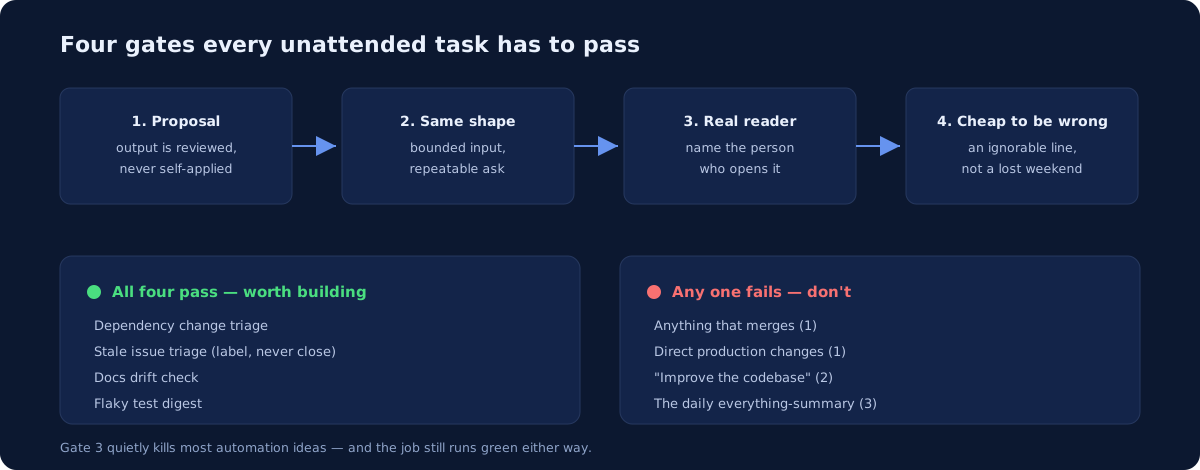
What makes a task a good candidate
Four properties. A task needs all four, and the third is the one people skip.
It produces a proposal, not an action. The output is a pull request, a comment, or a report — something a human accepts or discards. The moment an unattended agent’s output takes effect without review, you have traded a small recurring cost for a rare expensive one.
It has the same shape every time. “Check whether any dependency updated this week has a breaking change in its changelog” is a bounded, repeatable task. “Improve the codebase” is not a task, it’s a wish.
Someone will actually read the output. This is the criterion that quietly kills most automation ideas, and it’s worth being honest with yourself before you write the workflow. If you can’t name the person who opens this on Tuesday morning, don’t build it. An unread report isn’t neutral — it costs tokens, it adds a job that can fail and needs maintaining, and it trains the team to ignore a channel.
Being wrong is cheap and visible. A mistaken dependency note wastes a minute. A mistaken production change wastes a weekend. Automate where the blast radius of a bad answer is an ignorable paragraph.
The mechanics you need
Automation mode has a few behaviours that differ from the interactive path, and they matter for unattended runs.
Tools are denied by default. With a plain-text prompt, Claude has no shell and no GitHub API access until you grant it — via --allowedTools in claude_args, or a permissions.allow rule in the settings input. This is a good default for scheduled work: grant the two tools the job needs and nothing else. If you invoke a skill instead of a plain prompt, the skill’s allowed-tools frontmatter governs.
Output goes to the run log unless you ask otherwise. By default, results appear in the workflow run log rather than as a comment. Claude posts to an issue or PR only when the prompt says to and it has a tool that can. A job that “worked” but seems to have produced nothing is usually this.
Scheduled runs still face the bot check. The write-access check is skipped for schedule events — no user authored them — but the human-actor check still applies, and GitHub attributes scheduled runs to a repository user, usually whoever last edited the cron line. If that account is a bot, it needs to be in allowed_bots or the run fails.
GitHub’s own scheduling limits apply. Scheduled workflows run only from the default branch, so you cannot test a cron change on a branch. And on public repositories, GitHub disables the schedule after 60 days without repository activity — a quiet failure mode for a low-traffic repo.
A skeleton:
on:
  schedule:
    - cron: "0 9 * * 1"        # Monday 09:00 UTC
jobs:
  triage:
    runs-on: ubuntu-latest
    timeout-minutes: 15
    permissions:
      contents: read
      issues: read
      id-token: write
    steps:
      - uses: anthropics/claude-code-action@v1
        with:
          anthropic_api_key: ${{ secrets.ANTHROPIC_API_KEY }}
          prompt: "Summarise dependency updates merged in the last 7 days..."
          claude_args: |
            --max-turns 8
            --allowedTools "mcp__github__list_commits,mcp__github__list_issues"
Note contents: read, not write. A reporting job should not be able to push. Start every automation at read-only and add scopes only when a specific step demands one.
Recipes worth building
These are patterns that satisfy all four criteria. They are starting points to adapt, not benchmarked results — how well each performs depends entirely on your codebase and how specific your prompt is.
Dependency change triage. Weekly, summarise what dependency bumps actually changed — breaking changes, deprecations, anything touching a package you use heavily. Bots already open the PRs; the missing piece is a human-readable read of what the diff means. Bounded input, obvious reader, harmless if wrong.
Stale issue triage. Monthly, find issues untouched for 90 days, group them by whether they look fixed, still-valid, or unclear, and post a single summary comment. Have it label rather than close — a wrong label costs a second to fix.
Docs drift check. On a schedule, compare recent changes in a directory against the docs that describe it and open an issue listing likely-stale pages. This one earns its place because the failure mode of not doing it is invisible until a customer hits it.
Flaky test digest. Weekly, read recent CI runs and report which tests failed intermittently, with run links. Cheap, specific, and the output is something a team lead genuinely wants on a Monday.
Post-incident timeline draft. Triggered by a label rather than a schedule: assemble a first-draft timeline from commits, deploys, and issue comments around an incident window. A human writes the analysis; the agent does the tedious reconstruction. If you’re on a SOC 2 track, the evidence trail here matters — see our SOC 2 infrastructure checklist.
Recipes that look good and aren’t
Anything that merges. An agent that opens PRs is useful; one that merges them has removed the review gate you built the whole pipeline around. Our GitHub Actions guide covers enforcing this with branch protection.
“Review every PR” as your first automation. Not because it’s a bad use case — it’s one of the best — but because it deserves a considered setup rather than a cron job, and because a review bot that comments on everything gets muted within a fortnight. Whether these tools catch real bugs is worth reading up on first: we looked at that in AI code review tools in 2026.
Anything touching production directly. Scheduled infrastructure changes with no human in the loop are the single riskiest thing you can build here. If it’s Terraform, the guardrails in can AI agents safely run Terraform? apply with more force when nobody is watching the run.
The daily everything-summary. The one that reads all commits, issues, and PRs and posts a digest. It reliably produces text nobody reads, because a summary of everything is a summary of nothing.
Guardrails for unattended runs
Interactive runs have a human watching. Scheduled ones don’t, so the caps do that job:
--max-turnsandtimeout-minuteson every job. A confused agent at 3am with no turn cap is a billing incident.- A
concurrencygroup, so a backlog of triggers can’t start ten agents at once. - Read-only by default. Grant
contents: writeonly to jobs that genuinely open PRs. - A cheaper model for triage. Summarising a changelog does not need your most capable model;
--modelis per-job. - Spend limits in the Claude Console, as the backstop that doesn’t depend on you getting every workflow right.
Then review the automations themselves on a schedule. An automation that made sense in March may be producing noise by September, and nothing in the system will tell you — the job stays green either way. Put a recurring calendar item on it and delete the ones nobody reads.
Start with one
The honest advice is to build a single automation, pick the one with the most obvious reader, and let it run for a month before adding a second. Most of what determines whether this works is prompt specificity and whether the output lands somewhere a person already looks — neither of which you can tune from a blank page.
Someone still has to own the workflows, the token caps, and the quarterly cull of automations nobody reads. At 5-25 engineers that’s rarely a full-time job, which is the shape of work a monthly DevOps retainer covers. If you have agent workflows running already and want the permissions and spend surface reviewed, our infrastructure audit includes CI/CD hardening.
Automation-mode behaviour, tool defaults, and scheduling constraints in this guide follow Anthropic’s Claude Code GitHub Actions documentation and GitHub’s scheduled-workflow documentation. The recipes are patterns, not measured results.
Newsletter
One practical DevOps guide a week
Real numbers, honest trade-offs, no vendor fog — same as everything here. Unsubscribe anytime.