Guides · Cloud Cost · Kubernetes · FinOps
Kubernetes Cost Optimization: 7 Fixes That Cut 30–50%
· 3 min read
FinOps went from a finance buzzword to an engineering discipline because the waste is real: most Kubernetes clusters we see run at 20–35% actual utilization while paying for 100% of the nodes. The gap is structural — requests guessed at launch, nodes sized by vibes, dev environments running all weekend. Here are the seven fixes, ordered by payback speed, that reliably take 30–50% off a startup’s cluster bill.
1. Fix your resource requests (the big one)
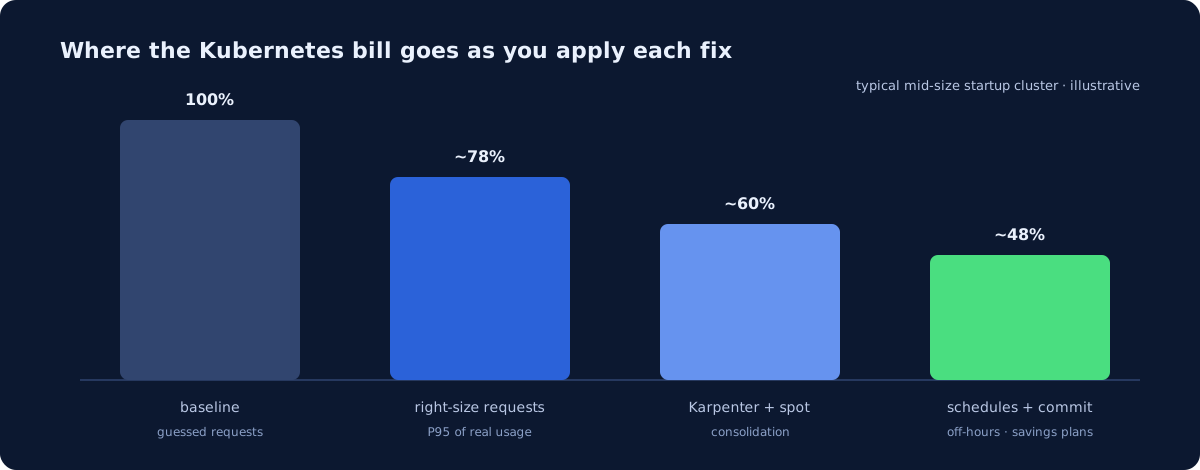
Kubernetes schedules on requests, not usage. When every deployment requests 1 CPU “to be safe” and uses 80m, the scheduler packs three pods where thirty would fit, and the autoscaler buys nodes to hold reserved air. Pull 30 days of actual usage (Prometheus has it — see our monitoring stack), set requests near the P95 of real consumption, keep limits sane, and watch node count fall. This one change is routinely 15–25% of the entire bill.
2. Replace static node groups with Karpenter
Cluster Autoscaler scales fixed-size groups; Karpenter provisions exactly the nodes the pending pods need, from the whole instance catalog, in seconds, and consolidates underused nodes away continuously. On AWS it’s the default answer now. We’ve written up how it works and what it saves on our Karpenter page — in practice it compounds fix #1: right-sized pods plus a right-sizing provisioner.
3. Put stateless workloads on spot
Spot/preemptible capacity is 60–90% off on-demand price. The rule that makes it safe: spot for anything that can die and restart (web replicas, workers, CI runners), on-demand for state and singletons. Karpenter handles the interruption dance — diversified instance types, graceful drains, automatic fallback to on-demand.
4. Turn off nights and weekends
Dev and staging clusters running 168 hours a week are used for maybe 50. Scaling non-production to zero outside working hours is a cron job’s worth of engineering that pays ~70% of those environments’ cost, forever. Nobody does it because nobody owns it.
5. See who spends what (Kubecost or OpenCost)
Shared clusters hide cost the way shared apartments hide dishes. Kubecost (or CNCF’s OpenCost) allocates node cost to namespaces and teams, shows efficiency per workload, and makes the “why is staging $4K/month?” conversation possible. The trend worth copying from big FinOps shops: surface projected cost in the pull request, before the spend exists.
6. Check the boring storage and network lines
Orphaned persistent volumes from deleted workloads, gp2 volumes that should be gp3, cross-AZ traffic between chatty services, load balancers nobody deleted — the same archaeology we detail in the AWS bill guide applies inside clusters. Typically $500–3,000/month on a mid-size startup account.
7. Commit to your floor
After fixes 1–6 shrink the fleet, the remaining 24/7 baseline should sit on Savings Plans / committed-use discounts — another ~30–40% on that portion. Commit after optimizing, never before, or you lock in the waste.
What order should you do this in?
Visibility first (30 minutes), requests second (the big unlock), Karpenter + spot third, schedules and commitments last. A focused engineer lands the whole list in a couple of weeks — the pattern is common enough that it’s a standard outcome of our Infra & Cost Audit: $1,900, five days, and if the report doesn’t find at least $10K/year in savings and risks, it’s free. Run the cost calculator to see what your stack should cost, or start with the free health check — question 8 is about exactly this.
Newsletter
One practical DevOps guide a week
Real numbers, honest trade-offs, no vendor fog — same as everything here. Unsubscribe anytime.