Guides · Cloud Cost · cloud-cost · finops · aws
Cloud Cost Optimization for Startups: The Complete Guide
· 11 min read
Most startup cloud waste is not exotic. It is a handful of predictable things — instances sized for a load test that never ended, storage detached from machines that were deleted a year ago, non-production environments running at 3am, and log ingestion nobody scoped. You can usually find a meaningful share of it in an afternoon, before buying any tooling or committing to anything.
This guide covers the whole discipline for a funded startup with 5-25 engineers: where the money actually goes, the order to look in, how commitment discounts work, when a cost platform earns its price, and how to stop the savings creeping back. Each section links the deep-dive that works through it properly.
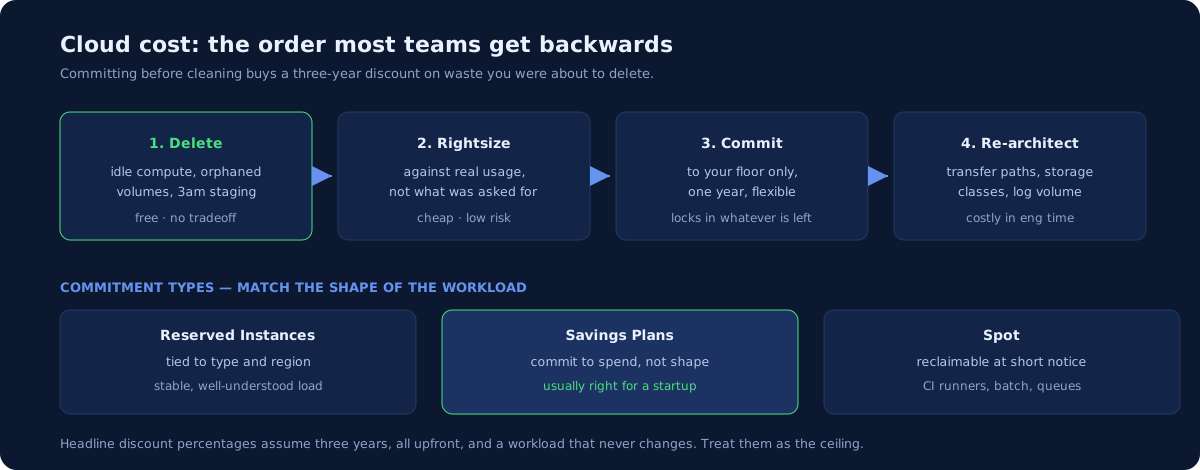
The order that matters
There is a correct sequence here, and most teams get it backwards by starting with commitments.
- Delete what nobody uses. Free, instant, no tradeoff.
- Rightsize what remains. Cheap, low risk.
- Commit to the baseline you are left with. Only now — committing to a footprint you have not cleaned means buying a discount on waste for three years.
- Change the architecture. Expensive in engineering time, so last.
Buying Reserved Instances before step one is the single most common expensive mistake, because it locks in the oversized estate you were about to shrink.
Where the money actually goes
Four categories cover most startup bills.
Compute. Usually the largest line and the most oversized. The pattern is consistent: instances picked during a launch or an incident, never revisited. Nobody is punished for a machine being too big, so nothing shrinks on its own.
Storage that outlived its purpose. Unattached volumes, snapshots on no retention schedule, old backups nobody set an expiry on, and objects sitting in expensive storage classes that should have aged into cheaper ones. This is the purest waste on the bill — it buys nothing at all.
Data transfer. The line that surprises people, because it is billed per gigabyte and invisible until you look. Cross-zone chatter between services that could be co-located, egress to the internet, and replication traffic all land here.
Observability ingestion. Logs and metrics are usually billed on volume, and debug logging left on in production is a real and recurring cost. It also tends to grow silently with traffic.
For the provider-specific version of this — which line items to open first and what the confusing names actually mean — see why is my AWS bill so high and why is my GCP bill so high. The GCP one matters if you are on Google Cloud, because sustained use discounts, GKE Autopilot, and Cloud Run idle instances behave differently enough that AWS advice misleads.
The first pass
Before any tooling or commitment, work a fixed checklist. The specific checks we run first — and roughly what each tends to recover — are in how to cut your AWS bill 30%. The shape of it:
- Idle and oversized compute. Anything under sustained low utilisation is a candidate.
- Unattached storage and orphaned snapshots. Delete or set a retention policy.
- Non-production environments running out of hours. Staging does not need to run at 3am on a Sunday. Scheduled shutdown is often the single fastest win available.
- Old load balancers, NAT gateways, and elastic IPs attached to nothing.
- Storage lifecycle rules, so objects age into cheaper classes automatically.
- Log retention and sampling, scoped deliberately rather than left at default.
None of this requires an architecture change or a procurement decision, which is why it comes first.
Kubernetes, where waste hides differently
Kubernetes changes the shape of the problem. Your bill shows nodes, but your waste lives in the gap between what pods request and what they actually use — and requests are what the scheduler packs against. A cluster can look busy at the node level while most of its reserved capacity does nothing.
The specific fixes — right-sizing requests, autoscaling that responds to real demand, bin-packing, and handling workloads that genuinely need headroom — are in Kubernetes cost optimization.
One honest caveat: this is a crowded space where specialist vendors do this well. If your cluster spend is small, the effort of deep Kubernetes cost work may exceed the recovery, and the plain checklist above will serve you better.
Commitment discounts, explained properly
Once the estate is clean, commitments are the largest remaining lever. Three mechanisms, often confused:
| What it is | Flexibility | Best for | |
|---|---|---|---|
| Reserved Instances | Commit to specific instance attributes for 1 or 3 years | Lowest — tied to type and region | Stable, well-understood workloads |
| Savings Plans | Commit to an hourly spend level for 1 or 3 years | Higher — applies across instance families and often services | Most startups |
| Spot | Spare capacity sold cheaply, reclaimable at short notice | None — can be taken back | Batch, CI runners, anything interruptible |
Providers publish steep headline discounts for the longest, least flexible commitments. Treat the headline number as the maximum, not the expectation — it usually assumes three years, all upfront, and a workload that never changes. A startup’s estate rarely survives three years unchanged.
The practical approach for a small team:
- Commit only to your floor. Look at the last few months and find the level of spend you never drop below. Commit to some fraction of that, not to your average and never to your peak.
- Prefer flexibility over the last few percentage points. A Savings Plan that still applies after you change instance families is worth more than a marginally cheaper Reserved Instance that strands.
- Start with one year. Three-year terms suit companies whose shape is predictable. If you are still finding product-market fit, that is not you.
- Put CI and batch work on Spot. Interruptible by nature, and it is the lowest-risk way to use the cheapest capacity.
When a cost tool earns its price
Cost platforms are genuinely useful at a certain size and premature below it. The honest threshold: when you have enough spend and enough services that allocation — which team, product, or customer caused this — is a real question your own tagging cannot answer.
Below that, your provider’s native cost explorer plus disciplined tagging answers the same questions for free. And a tool priced as a percentage of cloud spend can quietly cost more than the waste it surfaces.
Cloud cost tools compared covers the main options, what they price at where prices are published, and — since we sell a competing service — where a tool beats hiring anyone, including us.
Managed services versus running it yourself
This is the cost decision small teams get wrong most often, in both directions.
A managed database costs noticeably more per month than the same engine on a raw instance. The instinct when a bill grows is to move it in-house and pocket the difference. Sometimes that is right. Usually, for a team of this size, it is not — because the price difference buys backups, patching, failover, and a support path, and the alternative is an engineer’s attention forever rather than a line item once.
The honest way to run the comparison is to put the engineering time on the same side of the ledger as the invoice. A self-managed database that saves a few hundred pounds a month and costs two engineer-days a quarter has not saved anything. The reverse also holds: a managed service you are paying a large premium for and never using the managed features of is worth questioning.
Two rules that hold up:
- Managed by default for anything stateful. Databases, queues, and caches are where self-hosting failures are most expensive and least recoverable.
- Self-host where the workload is stateless, well understood, and genuinely large. That is where the premium stops being insurance and starts being pure margin.
Forecasting spend when you have a runway
Funded startups have a constraint most cost advice ignores: the number has to be predictable enough to put in a board deck, not just low.
Three things make cloud spend forecastable:
Separate the baseline from the variable. Your floor — the spend that exists whether or not anyone uses the product — should be a known, stable number. What varies with traffic should be understood as a rate: cost per thousand requests, per active customer, per gigabyte processed. Once you have that rate, growth becomes arithmetic instead of a surprise.
Know your per-customer marginal cost. For most startups this is small and worth knowing anyway, because it is the input to pricing decisions and to any conversation about gross margin. If onboarding a large customer changes your infrastructure cost materially, you want to have found that out before the contract, not after.
Model the step changes. Cloud costs are rarely smooth. Crossing a support tier, adding a region, or moving from a shared to a dedicated instance are step functions. Knowing roughly where the next step sits stops it landing mid-quarter as a surprise.
None of this requires a FinOps function. It requires the baseline separated from the variable once, and someone re-checking it when the shape of the business changes.
Making it stick
Every cost exercise decays. Savings found in March are gone by September unless something changes structurally. Four things make it durable:
A named owner. Cost has no natural home — it is everyone’s third priority. One person accountable for the number, reviewing monthly, with authority to act.
Tags enforced, not requested. A tagging policy nobody enforces produces a cost report nobody can use. Policy-as-code can require an owner tag at admission time, which is the difference between a convention and a rule.
Budget alerts that fire before the invoice. Anomaly detection on unexpected increases, routed to a human who will look.
Cost visible in the deploy path. Infrastructure-as-code with cost estimation on pull requests puts the number in front of the person making the decision, at the moment they make it. That is far more effective than a monthly report after the money is spent.
That last one is a platform capability rather than a finance process, which is the general lesson here: cost control that depends on discipline erodes, and cost control built into the pipeline does not. Our delivery platform guide covers where it fits.
The cuts that backfire
Cost work has a failure mode: savings that create a larger cost somewhere less visible. Five that recur.
Deleting snapshots that turned out to be the only backup. Old snapshots are usually waste. Occasionally one is the sole copy of something. Check what a snapshot is before deleting it, and confirm a real backup exists first — a tested restore is worth more than the storage saved.
Cutting non-production so hard that engineers cannot test. Scheduled shutdown of idle staging is excellent. Removing preview environments to save money pushes testing into production and serialises the team behind a shared box. The infrastructure got cheaper and the engineering got slower, which is a bad trade at startup salaries.
Turning off logging you are contractually required to keep. Log volume is a legitimate target, but retention periods sometimes come from a compliance commitment rather than a default. Check before you shorten one — discovering this during an audit is expensive. Our SOC 2 infrastructure checklist covers which logs auditors expect and for how long.
Committing for three years pre-product-market-fit. The deepest discounts require the longest commitment. If your architecture, scale, or even cloud might change within the term, the discount is a bet you are likely to lose.
Optimising the 5% while ignoring the 40%. Cost work is satisfying, which makes it easy to spend a week shaving a small line item while the largest one goes unexamined. Sort the bill descending and start at the top, every time.
The common thread: the cheapest infrastructure is not the goal. The goal is spend that matches what the business actually needs, with nothing paid for that nobody uses.
What to do this quarter
- Spend an afternoon on the first-pass checklist. Delete, don’t optimise.
- Rightsize compute against actual utilisation, not against what was provisioned.
- Only then, commit to the floor you are left with — one year, flexible.
- Assign an owner and put thirty minutes in the calendar every month.
- Revisit tooling when allocation becomes a question you cannot answer yourself.
If you would rather not do it yourself
Our $1,900 infrastructure and cost audit is exactly this exercise, run against your accounts, delivered as a prioritised 90-day fix list with the numbers attached — and it is guaranteed to find at least $10K a year in savings and risks, or you don’t pay. Ongoing, the monthly DevOps retainer includes the review that stops it creeping back. If you want a free read first, the two-minute health check asks the cost questions that predict most of this.
Common questions
How do startups reduce cloud costs?
Most of the recoverable waste sits in a short list: idle and oversized instances, unattached storage volumes and old snapshots, forgotten non-production environments, unnecessary data transfer, and log or metric ingestion nobody scoped. Working that list finds more than any tool purchase, and it takes an afternoon rather than a project.
What is the difference between Reserved Instances, Savings Plans, and Spot?
Reserved Instances and Savings Plans are both commitments - you promise a level of spend or usage for one or three years in exchange for a discount, with Savings Plans being the more flexible of the two. Spot is unused capacity sold cheaply that can be reclaimed at short notice. Commit for your steady baseline, use Spot for interruptible work, and pay on demand for the spiky remainder.
When is a cloud cost tool worth paying for?
When you have enough spend and enough services that allocation is genuinely hard - typically past a few tens of thousands a month, or once several teams share an account. Below that, your provider's own cost explorer plus tagging discipline answers the same questions, and a tool priced as a percentage of spend can cost more than the waste it finds.
Who should own cloud cost at a startup?
One named person, reviewing monthly, with authority to act. Cost has no natural owner - it is everybody's third priority - so it drifts until someone is accountable for the number. The review matters more than the seniority: a thirty-minute look at the top five line items each month catches most creep before it compounds.
Newsletter
One practical DevOps guide a week
Real numbers, honest trade-offs, no vendor fog — same as everything here. Unsubscribe anytime.