Guides · Cloud Cost · cloud-cost · finops · tools
Cloud Cost Tools Compared: CloudZero, Vantage, Kubecost
· 7 min read
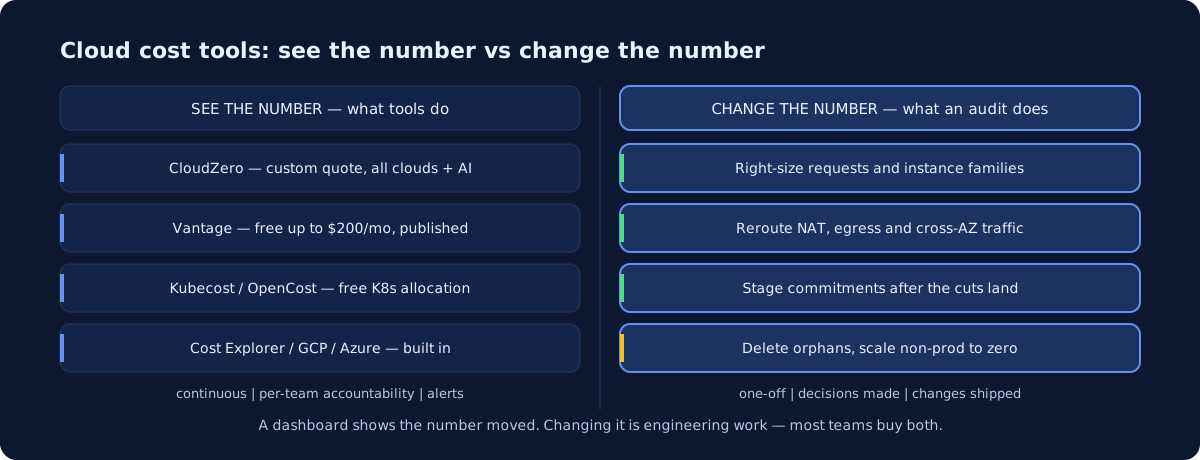
If you need a number on a dashboard every morning — per team, per service, per customer — buy a tool. If you need that number to be smaller by the end of the quarter, buy an engineer’s attention. Those are different products, and the honest answer for most funded startups is that you eventually want both: a cost platform for continuous visibility and team accountability, and a one-off deep pass to restructure the things the platform is merely measuring. Disclosure up front: ByteDel sells one of the options being compared — a $1,900 Infra & Cost Audit — so treat the tool sections below as the fairest case I can make for the alternatives.
What does each of these options actually do?
Three of them are cost platforms that ingest billing data and give you reports, allocation, budgets and anomaly alerts. One is your cloud provider’s built-in tooling, which you already pay for and probably under-use. The last is a human doing an engineering review and handing you a change list. Here is the comparison, with pricing exactly as each vendor publishes it — and explicitly marked where they publish nothing.
| Option | Pricing (as published) | Setup effort | Best at | Weak spot |
|---|---|---|---|---|
| CloudZero | No list price. CloudZero’s pricing page says “Request a custom price quote” for a single subscription “aligned to the scale and complexity of your AI or cloud environment” | Days — connect billing sources, then model your cost dimensions | Unit economics: cost per customer, per feature, per model. Unlimited users and dimensions per the same page | You can’t budget for it without a sales call; aimed above the 10-engineer band |
| Vantage | Published tiers: Starter free (up to $2,500/mo tracked spend, 3 users), Pro $30/mo ($7,500 spend, 5 users), Business $200/mo ($20,000 spend, 10 users), Enterprise custom — per Vantage’s pricing page | Hours — read-only role, first reports same day | Transparent price, 30+ providers (clouds plus Datadog, Snowflake, MongoDB, OpenAI and others per the same page) | Tracked-spend ceilings mean the price steps up as you grow |
| Kubecost (IBM) | Foundations tier “always free” for unlimited clusters up to 250 cores with 15-day metric retention; Enterprise self-hosted and Enterprise Cloud are buy-now/contact-sales with no published rate, per the IBM Kubecost pricing page | Half a day — Helm chart, cloud billing integration | In-cluster allocation: namespace, workload, and efficiency data no billing export gives you | Kubernetes only; retention and core limits push growing clusters to a sales conversation |
| OpenCost | Free and open source; a CNCF incubating project per opencost.io | Half a day, plus you own the upgrades | The same allocation model with no vendor relationship; integrates AWS, Azure and GCP billing APIs | No UI polish, no support, no alerting — you assemble the rest |
| Native cloud tools | AWS Cost Explorer is free in the console; API requests cost $0.01 each and hourly granularity is $0.00000033 per usage record per day (about $0.01 per 1,000 records monthly) per AWS’s Cost Explorer pricing page. Google’s cost management page lists Billing reports, budgets, Recommender and FinOps Hub as free, with standard BigQuery charges if you query the billing export. Microsoft’s Cost Management overview documents cost analysis, budgets, anomaly alerts, tag inheritance and exports; that page states no fee | Zero — already on | Being there. Good enough to find the top three line items on any cloud | Weak cross-cloud view, weak tagging enforcement, no opinion about what to do |
| One-off expert audit | ByteDel’s is $1,900 for a five-business-day pass, with a written guarantee of at least $10K/year in findings — see pricing | A read-only role and one kickoff call | Deciding and sequencing: which cuts, in what order, at what risk | It’s a snapshot. It does not watch your bill next month |
What do these tools actually cost in practice?
Vantage is the only vendor here that publishes a full price list, and the numbers are small: free under $2,500/month of tracked spend, $30/month up to $7,500, $200/month up to $20,000, per their pricing page. CloudZero publishes no list price at all — the pricing page routes to a custom quote, which in practice means it is sold to organisations large enough to justify a sales cycle. Kubecost’s free Foundations tier covers unlimited clusters up to 250 cores, which is genuinely most startups; above that, IBM does not publish a rate.
The number that matters more than the sticker is the hidden one: someone has to own the tool. Tags get enforced, anomaly alerts get tuned. A cost platform with nobody assigned to it is a $200/month screensaver.
What can a dashboard not do?
Every tool here answers “what did we spend, and on what?” None of them answers “change it.” A dashboard will tell you your EKS nodes are 28% utilised; it will not open the deployment manifests and move 200 resource requests to the P95 of real usage. It will show NAT gateway processing as a five-figure line; it will not add VPC endpoints for S3 and ECR, or move chatty services into the same AZ. It will flag low Savings Plan coverage; it will not decide when to commit, which is the whole trick — commit before you right-size and you lock the waste in for three years.
That gap is why the tool-versus-audit framing is wrong. The tool measures; the engineering changes. Our Kubernetes cost optimization guide walks the change list in order, and the AWS bill anatomy post covers the metered line items — NAT, cross-AZ, log ingestion — that dashboards surface accurately and nobody acts on.
When is a tool clearly the better buy?
When the problem is ongoing and social rather than technical and one-off. If three teams share one cluster and nobody can say whose workload doubled last Tuesday, you have a visibility problem, and a one-off report ages out of usefulness in six weeks. Buy the tool.
A platform beats an audit when you need per-team chargeback, a monthly forecast for finance, anomaly alerts before the invoice arrives, or cost-per-customer for pricing decisions. Vantage’s free tier and Kubecost Foundations make this an easy call — the trial costs an afternoon. Do that first, honestly, before you pay anyone for a review.
When is a one-off audit the better buy?
When you already know the bill is too high and what you lack is a decision, not a chart. A dashboard shows a hundred true facts; an audit tells you which four to act on, in what order, and what breaks if you get it wrong. That’s judgement about your architecture, and no tool ships it.
It also fits a specific shape of team: 5–25 engineers, nobody whose job title contains “infrastructure,” a bill somewhere between $8K and $80K a month that grew faster than headcount. In that situation the tool would tell you things you’d have to hire someone to interpret anyway. You can see the exact deliverable — the findings format, the sequencing, the risk notes — on our sample audit page, or check what your stack should cost with the cost calculator before spending anything.
What should a 5–25 engineer team do first?
Turn on the free things this week: your cloud’s native cost tooling, Vantage’s Starter tier or Kubecost Foundations if you’re on Kubernetes. That’s a few hours and it establishes the baseline. Then decide whether your problem is seeing or changing.
If the number is visible and still wrong, the bottleneck is engineering time and priority — that’s the audit-shaped problem, and the fixes are the ones in our 30% reduction guide. If nobody can even attribute the spend, keep the tool and skip the audit until the picture is clear. Either way the honest sequence is: free tooling, then one deep pass to reset the baseline, then a tool to hold the line. Most teams that do all three stop having this conversation.
Not sure which half you’re in? The free infrastructure health check takes about four minutes and question 8 is exactly this.
Newsletter
One practical DevOps guide a week
Real numbers, honest trade-offs, no vendor fog — same as everything here. Unsubscribe anytime.