Guides · Cloud Cost · gcp · cloud-cost · finops
Why Is My GCP Bill So High? A Line-by-Line Teardown
· 8 min read
Your GCP bill is high for two reasons that compound: compute sized for load that never arrived, and per-unit metered charges — network egress, log ingestion, bytes scanned in BigQuery — that appear nowhere on your architecture diagram. GCP adds a wrinkle AWS doesn’t have: sustained use discounts apply automatically, so on-demand compute looks cheap enough that nobody gets around to committing. This is the GCP counterpart to our AWS bill teardown — same diagnostic structure, different meters.
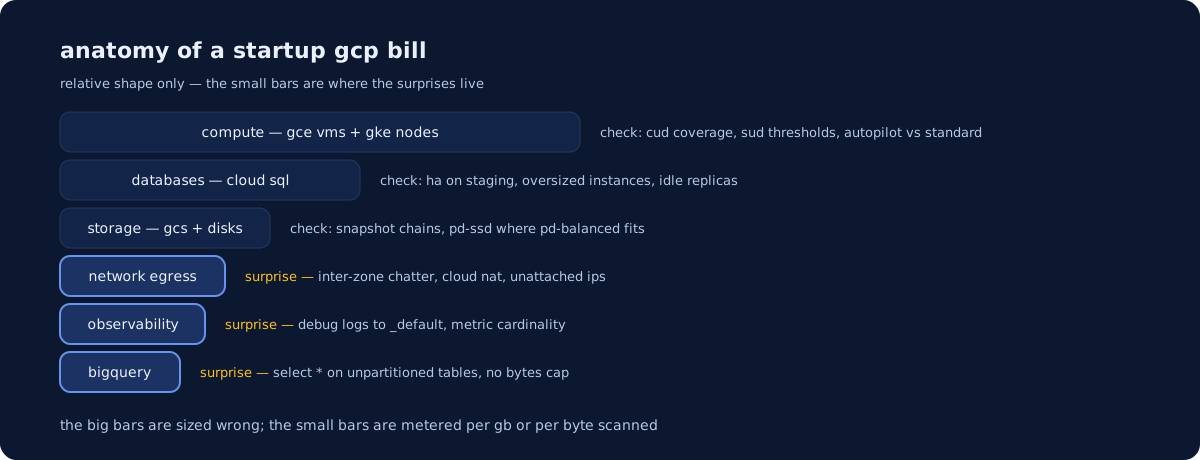
Where does the money actually go on GCP?
Compute is almost always the largest line, databases second, then a long tail nobody owns. The tail is where avoidable waste concentrates: each item too small to trigger an investigation, collectively large enough to matter.
| Line item | What to check | The usual fix |
|---|---|---|
| Compute Engine / GKE nodes | CUD coverage vs on-demand hours; average CPU | Right-size, then commit only what is steady |
| GKE Autopilot pods | Resource requests vs actual usage | Set requests from observed usage — Autopilot bills the request |
| Cloud Run | CPU allocation setting; minimum instances | Request-based billing unless cold starts hurt |
| Cloud SQL / Memorystore | HA and read replicas on non-production | Single-zone staging; schedule dev off |
| Disks & snapshots | Unattached disks; disk type; schedules with no retention | pd-balanced by default; retention on every schedule |
| Network | Inter-zone chatter, Cloud NAT, internet egress | Co-locate chatty services; private access paths |
| Logging / Monitoring | Ingestion volume vs what anyone queries | Exclusion filters on _Default; cut label cardinality |
| BigQuery | Bytes scanned per query; on-demand vs reservations | Partition, cluster, set maximum bytes billed |
| Idle resources | Unattached IPs, forwarding rules, orphaned LBs | Delete them; alert when they reappear |
Why do sustained use discounts hide the case for committing?
Because they arrive without you asking, making the on-demand rate look like the best deal going. Per Google’s sustained use discount documentation, SUDs apply automatically as monthly usage crosses thresholds at 25%, 50%, 75% and 100% of the month, to a maximum of 30% for N1, M1, M2 and shared-core types and 20% for N2, N2D and C2. Crucially, the same docs state SUDs do not apply to usage already covered by committed use discounts. The two never stack.
That is the trap: the right comparison is CUD pricing against the SUD-adjusted rate, not the list rate. Google’s CUD documentation describes spend-based commitments, an hourly dollar amount across eligible services, and resource-based commitments, Compute Engine-only and pinned to specific vCPU and memory in a region. Flexible compute commitments span Compute Engine, GKE and Cloud Run together — usually what a startup wants, since it survives a workload moving between the three. Usage above the commitment falls back to on-demand.
Is GKE Autopilot actually cheaper than Standard?
It depends entirely on how honest your resource requests are. Per Google’s Autopilot documentation, general-purpose pods use a pod-based billing model: you pay for what the pod requests, not the nodes underneath. Standard bills for provisioned nodes whether or not anything is scheduled on them.
So Autopilot removes the bin-packing tax and charges you for your requests instead. If those requests are whatever the first developer typed, you have moved the waste rather than removed it — and Google notes pods deployed with no resource values get pre-configured defaults. A second wrinkle: pods selecting specific hardware, such as a machine series or accelerator, fall back to node-based billing where you pay for the hardware plus a node management premium, so the economics change the moment a GPU workload lands. The discipline is the one in our Kubernetes cost optimization guide; if you are still choosing a control plane, the EKS vs GKE vs AKS comparison covers the trade-offs.
Why is Cloud Run costing more than “scales to zero” implied?
Because scale-to-zero is a property of one billing mode, not of Cloud Run generally. Google’s CPU allocation documentation describes two: request-based billing, the default, where CPU is allocated only during request processing plus startup and shutdown; and instance-based billing, where CPU is allocated and charged for the entire container instance lifecycle regardless of traffic.
Two settings move you off the cheap path. Switching to “CPU is always allocated” — often done to unthrottle a background job — makes an idle service always-on. Minimum instances keep warm instances running with full CPU access: right for cold starts, wrong as a default across eight staging services nobody hits after 6pm. Check both on every service first.
What’s driving egress and inter-zone charges?
Traffic crossing a boundary you didn’t know existed. Internet egress is metered per GB by destination, cross-region traffic is charged, and so is traffic between zones inside one region — so a service in us-central1-a calling a database in us-central1-b pays a toll on every call, in a topology most teams adopted for availability without ever pricing it. Rates change; read them off Google’s current VPC network pricing page, not a number in a blog post.
Two structural fixes beat trimming bytes: keep chatty services zone-aligned with their datastores where availability allows, and reach Google APIs over private access paths rather than routing out through Cloud NAT — which is worth auditing anyway, since image pulls from public registries on every deploy are a classic invisible contributor.
What quiet fixed costs are just sitting there?
Resources billed for existing rather than doing work: unattached persistent disks, pd-ssd where pd-balanced would serve, reserved external IP addresses attached to nothing, and forwarding rules and load balancers orphaned by deleted services. None of these produce a spike, so nothing alerts. They raise the floor instead.
Snapshots are the counterintuitive one. Per Google’s snapshot documentation, snapshots are incremental and you are billed on the total aggregate size of all of them — and deleting a snapshot that others depend on may not free much, because data needed to restore later snapshots is moved into the next snapshot in the chain, increasing its size. A daily schedule with no retention limit therefore grows indefinitely. Put retention on every schedule, and use the archive class — which Google describes as lower-cost geo-redundant storage suited to compliance and cold retention — for anything kept for years.
Why are Cloud Logging and Cloud Monitoring on the bill at all?
Because ingestion is metered, and one debug-level service can out-cost the machine it runs on. Google’s Cloud Logging routing documentation describes two system sinks: _Required, which captures admin activity and system event audit logs, cannot be modified or deleted, and retains 400 days; and _Default, which catches everything else, retains 30 days by default, and can be modified or disabled.
That second one is your lever: exclusion filters on the _Default sink stop chosen entries being ingested at all. Google also notes retention costs apply to log data kept beyond the default period, so “keep everything for a year” has a price attached. On the Monitoring side the driver is chargeable metric volume, which follows label cardinality — a custom metric labelled with user ID is a bill, not a metric.
How does one BigQuery query burn a month of budget?
On on-demand pricing you pay per TiB scanned, and an unpartitioned SELECT * scans everything regardless of the LIMIT you put on the end. One analyst exploring a large events table interactively can do real damage in an afternoon.
Google’s BigQuery cost-control documentation gives three guardrails worth setting today. The query validator and dry runs estimate bytes before execution, an upper bound on what gets billed. Maximum bytes billed makes a query over your threshold fail without incurring a charge. Custom quotas cap daily scan volume per project or user. Structurally, partitioning and clustering cut the bytes a query touches, and capacity-based (slot) reservations swap per-byte billing for predictable compute once scan volume is steady enough to forecast.
How do you read the billing console and BigQuery export?
Start in the billing console’s cost table grouped by service, then re-group by SKU — the GCP equivalent of AWS’s usage type, and the view most teams never open. It is where a vague “Compute Engine” total splits into instance cores, memory, egress and disk. Filter by project and label to attribute what you find.
For anything deeper, enable Cloud Billing export to BigQuery. Google’s export docs separate standard usage cost from detailed usage cost export; the detailed version is the one you want, because it adds resource-level data so a spike traces to a specific VM or disk rather than a service name. Two warnings from the same docs: each export type must be enabled separately, and it is not fully backfilled — regional datasets only hold data from the date you enabled it. Turn it on now even if you won’t query it for a month. Our GCP page covers how we set this up as standard.
When is it worth getting help?
When the bill crosses roughly $10k/month, when startup credits are about to expire, or when nobody has opened the SKU-level view. Our infrastructure audit comes with a guarantee: if we don’t find savings and risks worth more than the fee, you don’t pay. See the deliverable in a sample audit report, and the DevOps cost calculator will tell you what ongoing help should cost before you talk to anyone, us included.
Newsletter
One practical DevOps guide a week
Real numbers, honest trade-offs, no vendor fog — same as everything here. Unsubscribe anytime.