Guides · AI & DevOps · AI Coding · Production Readiness · SRE
Making a Vibe-Coded App Production-Ready: The Checklist
· 5 min read
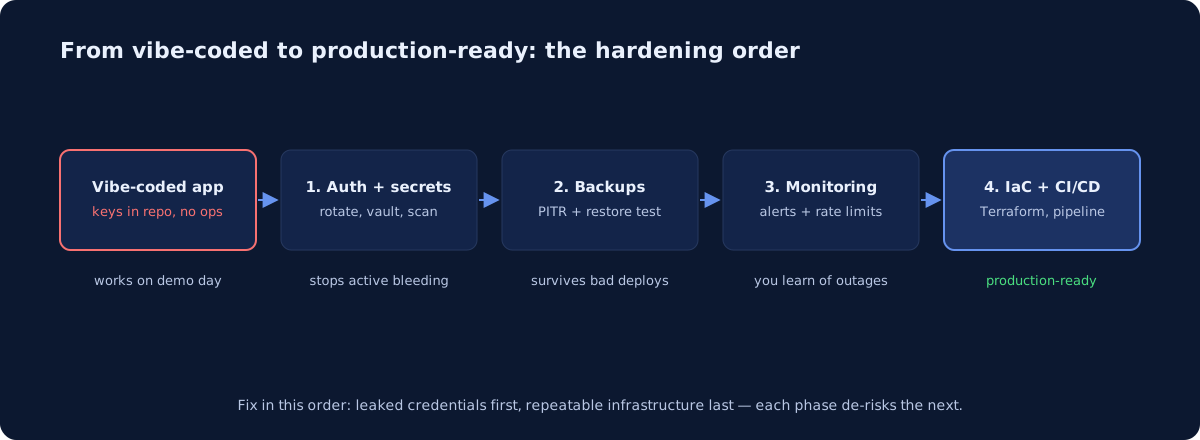
A vibe-coded app — built fast with Cursor, Claude Code, Lovable, or Bolt — almost always needs the same fixes before real users and real money touch it: server-side auth, secrets out of the code, tested backups, basic monitoring, rate limits, infrastructure-as-code, and a repeatable deploy. For a typical early-stage app, we’d tell clients to budget one to three weeks of focused work for that hardening pass — not a rewrite. The order matters more than the tooling: leaked credentials first, repeatable infrastructure last, because each step de-risks the next.
What does “production-ready” actually mean here?
It means the app survives the four things that reliably happen after launch: someone attacks it, someone deletes data, something breaks silently, and someone has to change it under pressure. The AI didn’t write bad application code, usually — it wrote code with no operational context. It doesn’t know your database has no backups or that the API key it helpfully inlined is now in a public repo. Production-readiness is the layer around the code, and that layer is exactly what prompt-driven development skips.
Is your auth actually enforced on the server?
Check this first because it’s the most commonly broken thing in AI-built apps. AI tools generate beautiful login screens, then sometimes enforce authorization only in the client — the API happily serves any row to anyone who asks with the right ID. Verify three things:
- Every API route checks the session server-side, not just the UI. Test with
curland no cookie. - Authorization, not just authentication: user A must not be able to fetch user B’s records by changing an ID in the URL.
- Row-level security if you’re on Supabase or Postgres directly — vibe-coded Supabase apps with RLS disabled are a well-known failure mode, because the anon key ships to every browser by design.
Where are your secrets right now?
If the app was AI-generated, assume secrets are in the git history until proven otherwise — pasted into prompts, committed in .env files, or hardcoded “temporarily.” The fix sequence: scan the full history with a tool like gitleaks or trufflehog, rotate everything found (rotation is the fix; deleting the file is not, the history keeps it), then move runtime secrets into your platform’s secret manager — AWS Secrets Manager, GCP Secret Manager, or Azure Key Vault — and enable GitHub’s push protection so the next paste gets blocked. We’ve written a fuller guide in how to keep secrets out of AI coding tools.
Could you survive losing the database tonight?
If the answer involves the word “probably,” you don’t have backups — you have hope. Managed databases make this cheap: AWS RDS, Cloud SQL, and Azure Database all offer automated backups with point-in-time recovery (per AWS docs, RDS retains up to 35 days). Turn it on, then do the part almost nobody does: actually restore a backup into a scratch environment and confirm the app boots against it. An untested backup is a rumor. If you’re on Supabase, Neon, or PlanetScale, check what your plan tier actually includes — backup behavior differs meaningfully between free and paid tiers, and vibe-coded apps are disproportionately on free tiers.
Would you know if the app went down?
Most founders find out from a customer tweet. The minimum viable observability stack costs almost nothing: an external uptime check (UptimeRobot, Better Stack, or a cloud-native health check) pinging a real endpoint, error tracking (Sentry’s free tier covers early-stage volume), and one alert route that reaches a human phone. Add rate limiting in the same pass — an app with an LLM API behind an unthrottled endpoint is a blank check, and scrapers will find it. Rate limit at the edge (Cloudflare, API Gateway) and set hard billing alerts on every LLM provider account.
Can you rebuild the whole thing from code?
The final phase: get the infrastructure itself out of clicked-together console state and into Terraform or OpenTofu, and get deploys out of “I push and pray” into a CI pipeline with a rollback path. This is what turns the previous fixes from one-time heroics into defaults — the backup config, the alarm thresholds, the security groups all live in reviewable code. It’s also the phase that makes the app sellable to your first serious customer, because “how do you deploy?” and “show me your infrastructure” appear in every security questionnaire.
What order should you fix things in?
| Phase | Checklist item | Why this order |
|---|---|---|
| 1 | Rotate leaked secrets, server-side auth | Active bleeding; exploitable today |
| 2 | Backups + one tested restore | Caps the worst-case loss of everything after |
| 3 | Uptime checks, error tracking, rate limits, billing alerts | You can’t fix what you can’t see |
| 4 | Terraform + CI/CD deploys | Makes phases 1–3 permanent and reviewable |
Phases 1–2 are days, not weeks. If you do nothing else this week, rotate secrets and turn on point-in-time recovery.
When should you bring in help?
Do it yourself if you have an engineer who’s run production before and a week to spend. Bring in outside help if you’re pre-first-hire, closing a customer who’s asking security questions, or already seeing bills or errors you can’t explain. This exact situation — AI-built app, real traction, no ops layer — is what ByteDel is built for: an infrastructure audit finds what’s exposed (here’s a sample audit report so you know what you’re buying), and our Cloud Launch package does the hardening pass above on AWS, GCP, or Azure. If you just want a quick read on where you stand, start with a free health check.
Shipping fast with AI was the right call — it’s how you found product-market signal without a platform team. The checklist above is how you keep the speed without keeping the exposure. And no, AI writing the code doesn’t remove the need for this work — it concentrates it.
Common questions
Can you run AI-generated code in production?
Yes, once it has been through the checks any other code gets: tests, a review gate, managed secrets, backups, monitoring, and a rollback path. The usual failure with AI-generated apps is not bad code - it is missing operational scaffolding, because the generator produced the feature and nothing around it.
Newsletter
One practical DevOps guide a week
Real numbers, honest trade-offs, no vendor fog — same as everything here. Unsubscribe anytime.